Your Tesla is whisper-quiet at 70 mph, yet plugged into your garage it suddenly sounds like a living machine — humming, clicking, thumping. Most owners assume something is wrong. It isn’t. Behind those sounds are high-voltage relays snapping into position, battery chemistry demanding precise temperatures, and thermal systems working harder than most people realize. The physics involved are genuinely fascinating, and once you understand what’s actually happening inside your car at night, you’ll never hear those sounds the same way again.
The Four Most Common Reasons Your Tesla Makes Noise While Charging
When your Tesla starts making noise during a charging session, it’s easy to assume something’s wrong — but in most cases, the car is simply doing its job. Four distinct systems are responsible for most charging sounds you’ll encounter.
First, cooling fans activate to manage heat generated by battery chemistry under fast-charging loads.
Second, high-voltage battery metals physically expand and contract as temperatures shift — those clunks and pops from your floor are structural, not catastrophic.
Third, the battery management system runs continuous software diagnostics, commanding coolant pumps and valves repeatedly throughout each session.
Fourth, the charging hardware itself (wall connectors, Superchargers, onboard electronics) produces transformer-like electrical hum during high-current delivery. Unlike home AC charging, Superchargers convert grid AC to DC using offboard industrial-grade rectification, which means the high-current conversion process occurs within the station equipment itself rather than inside the vehicle.
Winter supercharging sessions are especially prone to loud thumping sounds, as cold ambient temperatures increase the pressure differential inside the battery and cause metal shell flexing during rapid heat buildup.
Each noise source behaves differently depending on your model, ambient temperature, and charge rate. Grasping which system is speaking helps you distinguish normal operation from a legitimate concern worth investigating.
That clicking or humming sound during charging usually isn’t the car itself—it’s often the charging handle shifting slightly or resting under tension, which becomes more noticeable over time if the cable is left unsupported or pulling at an angle. Securing the connector in a fixed position with a Tesla wall charger cable organizer and connector dock helps keep the charging setup stable, reducing movement at the plug point that can contribute to those unwanted charging noises.
Battery Thermal Management Is the Loudest Culprit
When your Tesla charges, the battery pack generates real heat—physics doesn’t negotiate—and the thermal management system kicks in immediately to keep cell temperatures inside a safe operating window. You’ll hear electric coolant pumps circulating fluid through the battery loop, a chiller pulling heat out of the pack, and radiator fans ramping up as needed, all working together in a layered cooling choreography that gets noticeably louder during Supercharging than during a slow Level 2 session at home. Before arriving at a Supercharger, Tesla’s battery preconditioning system automatically raises pack temperature to enable faster charging ramp-up, which means thermal management activity may already be underway before you even plug in.
Hot weather amplifies everything, forcing the system to run harder and longer, so that humming or whirring you’re hearing on a 95°F afternoon in a closed garage isn’t a malfunction—it’s your battery staying alive. If fan noise suddenly sounds different or louder than your established baseline, worn fan bearings or debris partially obstructing airflow may be changing the sound character and warrant a closer inspection.
That buzzing, clicking, or faint vibration people notice during Tesla charging is often caused by small gaps at the connector point or environmental exposure that lets the plug sit slightly less secure than intended, especially in outdoor or fluctuating temperature conditions. A simple way to stabilize that connection and reduce unwanted movement is by using a weatherproof EV charging connector cover which helps keep the plug seated more firmly and reduces the kind of vibration that can turn into noticeable charging noise over time.
Heat From Charging
Charging a Tesla at high speed is fundamentally asking the battery pack to absorb a massive amount of energy in a short window, and physics doesn’t let that happen quietly.
High current flow during DC fast charging generates substantial heat directly inside the pack — that’s basic battery chemistry at work. The faster energy moves in, the more heat accumulates.
Tesla’s thermal management system responds aggressively, running coolant pumps, fans, and sometimes the compressor to pull that heat away and maintain thermal equilibrium across the cells. You’ll hear this happening.
It’s not subtle. The sounds intensify because the system is genuinely working hard, and that effort scales directly with how quickly you’re charging. Tesla’s onboard neural networks continuously process sensor data to support vehicle systems that operate alongside thermal management during active charging sessions.
Slower AC charging? Barely noticeable. A 250kW Supercharger session? Expect a response. Software updates can also temporarily alter how the fans behave as the system recalibrates its thermal management controls.
Cooling System Sounds
The loudest noise you’ll hear during a Tesla charging session almost definitely isn’t coming from the Supercharger itself — it’s coming from inside the car.
Your battery pack generates significant heat during charging, and the thermal management system responds by running coolant pumps and fans to pull that heat away.
The harder the system works (think Supercharging versus a slow Level 2 session), the louder those components get. You’ll typically notice whirring or humming sounds — that’s just battery acoustics doing their job.
Don’t credit cabin insulation for silencing much here, either; these mechanical components are audible from outside the vehicle.
The cooling loop may run continuously or cycle in short bursts depending on how aggressively your pack needs temperature regulation.
V3 Superchargers can deliver up to 250 kW of power, which pushes significantly more heat into the pack than a standard Level 2 session and demands the most from the thermal management system.
Weather Increases Activity
Outside temperature is one of the biggest variables controlling how loud your Tesla gets during a charging session. Cold weather slows battery chemistry, triggering battery preconditioning systems that hum, buzz, or thump as they warm the pack. Heat forces cooling hardware into overdrive. Either extreme pushes thermal management harder—and louder. Tesla’s over-the-air software updates can also adjust how thermal systems behave, meaning your vehicle’s charging noise profile may shift after an update even if nothing physically changed.
| Condition | System Response |
|---|---|
| Cold weather | Battery preconditioning activates, extending charge time 30–45 minutes |
| Hot weather | Fans amplify during Supercharging to prevent overheating |
| Rapid temp change | Metal components pop or clunk from expansion and contraction |
Treating these patterns as part of seasonal maintenance helps you anticipate noise instead of fearing it. Your Tesla isn’t struggling—it’s working exactly as designed.
Contactors and Relays Create Those Clicking Sounds
Most of what you’re hearing when you plug in your Tesla comes down to contactors and relays — the heavy-duty electrical switches responsible for connecting and disconnecting the high-voltage battery from the charging circuit. These aren’t incidental parts. They’re purpose-built switching hardware managing safe power delivery every session.
Here’s what those clicks actually represent:
- Circuit energizing — When charging begins, contactors physically close, completing the high-voltage path between battery and charger.
- Session termination — When charging stops, the relay opens, isolating high voltage immediately (no live connector sitting unattended).
- Mid-session adjustments — Charging rate changes trigger additional switching, which is normal battery management behavior.
Understanding contactor lifespan matters because these components cycle thousands of times across a vehicle’s life.
Relay maintenance isn’t typically a DIY task, but knowing they exist helps you distinguish routine clicking from something genuinely worth investigating. Regional differences also affect charging behavior, as EU vehicles support three-phase AC charging up to 11 kW through Type 2/CCS2 connectors, while North American models use NACS hardware with single-phase AC at around 7 kW — meaning the switching sequence and contactor load during a session can differ meaningfully between markets.
Where the Noise Is Coming From in Your Tesla
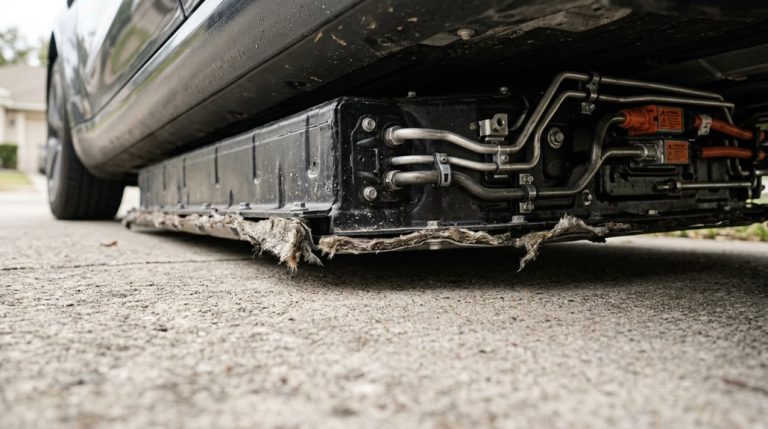
Most of the noise you’re hearing during a charging session originates from the rear floor area, where Tesla mounts the high-voltage battery pack flat along the vehicle’s undercarriage.
The coolant pumps and thermal management fans that keep that pack within its ideal temperature window (roughly 59–95°F, or 15–35°C) sit close to or within that same underbody zone, which means you’re basically listening to a liquid-cooling circuit and fan assembly working under real electrical load.
Sound travels through the chassis and underbody panels like a resonance chamber, so what feels like a broad, mysterious hum radiating from beneath your feet is almost always traceable back to those two specific hardware sources doing exactly what they’re designed to do. This thermal activity is especially pronounced when the car has been charging at home overnight using a Level 2 240V charger, which delivers enough power to trigger sustained cooling system operation throughout the session.
Rear Floor Battery Area
When charging noises seem to bubble up from beneath your feet, the rear floor battery area is often ground zero — and the explanation splits into two distinct categories worth knowing.
- Thermal expansion: Battery metal contracts and expands during charging, producing clunks or pops that travel through the floor structure.
- Rear seat flexibility: Missing reinforcement beneath the second-row footwell — common on LFP-retrofitted vehicles — creates hollow flex and buckling underfoot.
- Reinforcement retrofit fix: Tesla bulletin SB-24-10-005 addresses missing floor plates on affected VINs, sometimes requiring battery removal to install properly.
Context separates a normal thermal tick from a structural problem. If your rear floor moves noticeably when you step in, that’s not thermal physics — that’s a service appointment. Owners of standard-range Model 3 and 2021 Model Y vehicles that received an LFP battery retrofit are most likely to fall within the affected VIN range covered by the bulletin. When bringing a structural floor concern to Tesla, keeping professional installation records and receipts from any prior battery-area service can meaningfully support your case during the claims evaluation process.
Pump and Fan Location
Tracking a charging noise to its source is harder than it sounds — literally — because Tesla’s thermal management system distributes its working components across the entire underbody rather than concentrating them in one tidy location. Coolant pump location sits toward the front-center underbody, while fan placement typically runs rearward near the battery pack. Sound travels through chassis members, fooling your ears into misidentifying origins. Tesla’s software-first platform manages thermal demands dynamically, meaning the system can adjust pump and fan behavior through over-the-air updates without any physical hardware changes to the vehicle.
| Component | Location | Trigger |
|---|---|---|
| Coolant pump | Front-center underbody | Charging initiation |
| Cooling fan | Rear underbody | raised battery temp |
| AC compressor | Front mechanical bay | Chiller loop demand |
What you hear inside the cabin is often structural transmission — the floor acting as an amplifier — rather than a direct acoustic path from the actual source.
How Charging Speed and Cold Weather Make the Noise Worse
Not all charging sessions sound the same, and the two biggest variables driving that difference are charging speed and ambient temperature.
Charging sessions vary — and speed and temperature are the two variables that explain almost everything.
Faster charging pushes more current through the battery, raising thermal load and forcing pumps, fans, and compressors to work harder. Supercharging effectively stress-tests your thermal system in real time.
Cold weather compounds this. A cold-soaked pack triggers battery conditioning before charging even begins, which is why cold start diagnostics matter — your car’s already working before electrons start flowing at full rate.
Knowing this helps you build smarter charge scheduling strategies, like pre-conditioning before you arrive at a Supercharger.
In severe cold below 10°F, the battery’s available power output can drop to 60–70% of rated capacity, meaning conditioning cycles run longer and thermal systems stay active well into the charging session.
Here’s what amplifies noise specifically:
- Higher charging rates increase heat output, demanding stronger active cooling responses.
- Sub-freezing temperatures extend conditioning cycles, prolonging audible fan and pump operation.
- Rapid thermal shifts cause metal components to expand quickly, producing pops and clicks.
Normal Tesla Charging Sounds vs. Actual Warning Signs
Grasping which sounds are normal and which ones should put you on high alert is where all of that thermal and electrical knowledge actually pays off. User perceptions often skew anxious, but most Tesla charging noises — humming, whirring, soft clunks — are deliberate thermal and electrical processes protecting battery longevity. Your cooling fans cycling, your compressor kicking on, your battery enclosure flexing slightly from heat expansion? Completely expected.
What actually warrants concern is a different category entirely. Scraping, grinding, or metallic rubbing aren’t on Tesla’s list of normal charging sounds. Hard, repetitive banging (distinct from the occasional thermal thunk) signals something worth investigating. Electrical buzzing that escalates in volume or becomes erratic rather than maintaining a steady, low hum suggests a potential equipment or connection issue. The clearest red flag is when unusual noise pairs with charging interruptions or dashboard alerts — that combination moves the situation from “normal quirk” to “schedule a service appointment.”
What to Do If Your Tesla Charging Noise Seems Abnormal
When a Tesla charging noise crosses from “huh, that’s new” into “something’s actually wrong,” your first move isn’t to panic — it’s to methodically work through what you’re hearing before pulling the plug (literally).
Start by pausing the session and inspecting the connector, charge port, and EVSE for discoloration, debris, or heat.
No smoke or burning smell? Good — you’ve already narrowed the field.
Here’s your structured response:
- Stop and assess. Disconnect safely, check for error codes on your touchscreen, and document any reduced charging speed or session interruptions alongside the noise.
- Build diagnostic evidence. Record a short video capturing the sound, screen alerts, charger type, ambient temperature, and battery state — specifics that Tesla Service actually needs.
- Trigger service escalation. If the noise repeats across multiple sessions or originates near the battery pack, schedule an inspection immediately.
Patterns matter more than a single strange sound.
Frequently Asked Questions
Can Tesla Charging Noises Affect Nearby Neighbors or Disturb Sleep?
Tesla charging noises rarely cause neighbor disturbance or sleep interruption, but in very quiet environments, low-level humming can travel. You’ll minimize risk by scheduling charging during daytime hours instead of overnight.
Does Tesla Charging Noise Change as the Battery Ages Over Time?
Yes, it can change dramatically! As battery aging progresses, cell degradation alters thermal behavior, pushing your charge management systems to work harder—so you’ll likely notice longer or louder cooling cycles during charging sessions.
Are Certain Tesla Models Quieter During Charging Than Others?
Yes, certain models are quieter. Your Tesla’s perceived noise depends on its battery chemistry, insulation design, and build year. Newer vehicles often include revised components and improved acoustic insulation, making them noticeably quieter during charging than older builds.
Can Software Updates Alter How Loud My Tesla Sounds While Charging?
Coincidentally, just as you update your phone and notice different notification sounds, firmware tweaks can shift your Tesla’s audio profiles during charging — altering fan speeds, pump cycling, and thermal management intensity noticeably.
Does Charging Noise Impact the Tesla Warranty or Resale Value?
Normal charging sounds won’t hurt your warranty or resale perception. Warranty implications arise only when noises accompany errors or performance loss. For resale, document that sounds are normal—unexplained noise affects buyer confidence more than actual mechanical risk.