
Your Tesla’s battery isn’t just storing energy — it’s quietly running one of the most sophisticated thermal balancing acts in any consumer product on the market. Cold mornings slash your range. Hot afternoons throttle your performance. And charging speed? Entirely at the battery’s mercy. Most drivers assume it’s just a coolant loop doing the heavy lifting, but the reality is far more intricate. A web of heat pumps, valves, and chillers is making split-second decisions you never see — and understanding them changes how you think about every drive.
How Tesla’s Thermal Management System Uses Dual Coolant Loops
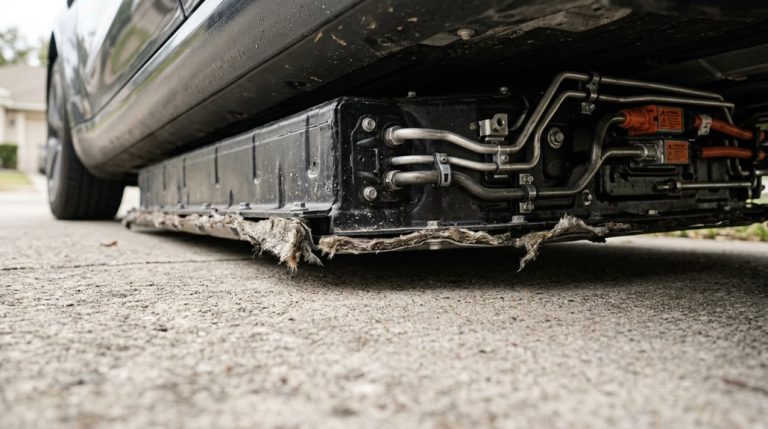
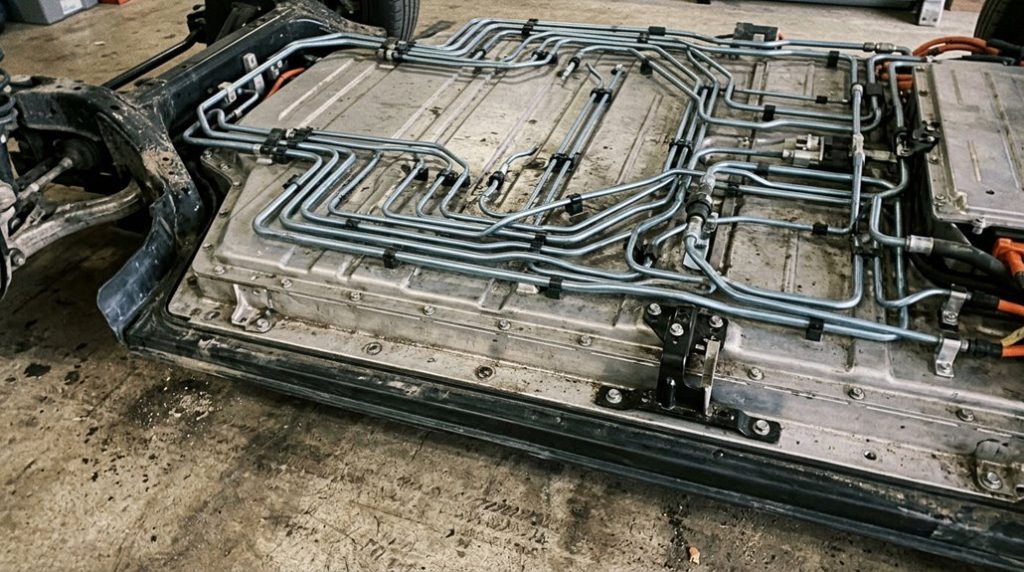
Most EVs rely on a single radiator loop to handle everything, which works until it doesn’t—Tesla takes a more surgical approach by splitting thermal duties across multiple interconnected coolant loops, each tasked with managing a specific system: the high-voltage battery pack, the drivetrain (motor and inverter), and the cabin.
Here’s where it gets interesting. A dual-mode valve governs how these loops interact through precise valve sequencing—switching between parallel mode, where each loop runs independently, and series mode, where coolant passes through the battery circuit first, then the drivetrain circuit. That sequential routing creates deliberate thermal coupling when shared heat exchange actually helps.
The glycol-based fluid (your coolant chemistry workhorse) absorbs or transfers heat depending on conditions, while dedicated hardware—chillers, heaters, 3-way bypass valves—give the system fine-grained control.
Every component gets exactly what it thermally needs, nothing more. This precision extends beyond thermal hardware—Tesla’s software-controlled feature gating means battery capacity itself can be selectively expanded or restricted post-production, as demonstrated when temporarily locked capacity was unlocked remotely during natural-disaster emergency responses.
Tesla battery temperature isn’t something you notice until range drops, charging slows, or performance feels inconsistent. Get real visibility into what’s happening under the hood by plugging in an OBD2 Bluetooth adapter for EV battery monitoring so you can track temperature behaviour, spot inefficiencies early, and understand your Tesla’s performance instead of reacting to it.
The Exact Temperature Range Tesla Targets for Peak Cell Performance
When people talk about Tesla batteries “liking” a certain temperature, they’re not being poetic—there’s a real performance curve behind it.
Lithium-ion chemistry responds directly to heat. Push cells too cold and internal resistance climbs. Push them too hot and degradation accelerates. Tesla’s thermal system threads that needle constantly, targeting a warm compromise that balances output with longevity.
Here’s where that lands practically:
- Peak capacity and lifespan converge around 25°C (77°F)
- Broader ideal window sits between 15.6°C and 26.7°C (60°F–80°F)
- Mid 20s°C represents the sweet spot for everyday driving efficiency
- 45°C releases more raw energy but shortens long-term durability
- Performance launches push pack temps to 52°C–58°C—useful for drag strips, not daily commutes
You’re not chasing the hottest cell state. You’re chasing the smartest one. Temperatures exceeding 60°C cross into hazardous territory, where the risk of accelerated cell degradation and thermal runaway becomes a genuine safety concern. To support the battery’s thermal needs before demanding drives, Tesla owners can precondition the battery while still plugged in, drawing thermal energy from the grid rather than depleting usable pack charge.
What Freezing Temperatures Do to Your Tesla’s Battery and Charging Speed
When your Tesla sits overnight in freezing temperatures, the lithium-ion cells lose efficiency because the electrochemical reactions inside them slow down greatly, and internal resistance climbs — physics working directly against you.
That resistance problem means your battery can’t accept charge as quickly as it normally would, so a cold-soaked pack at a Supercharger will throttle incoming power until the cells warm to an acceptable range (typically above 50°F). The Tesla built-in trip planner can precondition the battery before you arrive at a Supercharger, helping reduce this cold-weather charging penalty by warming the cells in advance.
In practical terms, you’re looking at a 20–40% range reduction below freezing, and a Model 3 Long Range rated at 358 miles might realistically deliver somewhere between 215 and 285 miles depending on speed, temperature, and how hard the battery management system is working to keep itself warm. Stop-and-go city driving may actually lessen this impact, as regenerative braking generates heat that helps bring the battery up to a more efficient operating temperature.
Cold’s Impact on Charging
Freezing temperatures don’t just reduce your Tesla’s range — they actively slow down how fast the battery can accept a charge, and the physics behind it are straightforward. Cold charging means reduced throughput because lithium ions move sluggishly through chilled electrolyte, forcing Tesla’s software to cap incoming power for safety.
Here’s what that looks like in practice:
- Sub-zero conditions can drop charging power to roughly 26 kW
- One test recorded 36% less energy accepted at 32°F versus 77°F
- Cold packs below 50°F (10°C) ramp up slowly at Superchargers
- Incoming energy partially diverts to warming the pack itself
- Peak charging efficiency sits between 77–104°F (25–40°°C)
Cold weather doesn’t care about your schedule — the chemistry simply won’t cooperate until temperatures rise. To counter this, Tesla’s battery preconditioning system raises pack temperature before arrival at a Supercharger, consuming approximately 3.4 kWh during a 30-minute preheat cycle to enable faster charging ramp-up. In Winter months, EVs can lose up to 39% of range according to the U.S. Department of Energy, making it critical to plan charging stops carefully.
Battery Heating in Winter
Keeping a Tesla battery warm in winter isn’t a luxury feature — it’s a core part of how the car stays functional when temperatures drop below 4°C (40°F). Below that threshold, cold cells struggle to deliver stable power, charge efficiently, or recapture energy through regenerative braking.
Tesla’s thermal system actively heats the battery using glycol-based coolant — the same fluid that cools it in summer. You can set an adaptive schedule through the Tesla app, targeting specific times, days, and locations so the battery’s ready before you even step outside.
Parking under insulated carports helps slow overnight heat loss, reducing how hard the system works to recover. Starting warm isn’t just comfortable — it’s measurably more efficient, since heating a cold-soaked battery near 0°C (32°F) can take over an hour. Tesla’s onboard neural networks process real-time sensor data continuously, meaning the vehicle’s systems — including thermal management — are always responding to current conditions rather than relying on pre-set static assumptions.
How Battery Preconditioning Works Before a Supercharger Stop
Before your Tesla pulls into a Supercharger stall, the high-voltage battery pack ideally needs to be within a specific thermal window—too cold, and lithium-ion chemistry slows charge acceptance dramatically, capping the kilowatts the pack can safely absorb.
Preconditioning solves this by warming the pack before arrival. Route timing handles everything automatically—set a Supercharger as your destination, and the system calculates when heating must begin. Several triggers exist:
- Entering a Supercharger into Tesla’s routing (the most reliable method)
- Scheduled departure preconditioning via the vehicle interface
- Saved location scheduling for home or work
- Tesla app climate activation (warms cabin and battery simultaneously)
- Maximum climate settings through the app as a manual workaround when routing isn’t active
One caveat: short drives may not allow enough time for the pack to reach ideal temperature. Preconditioning prepares the battery—it doesn’t add meaningful range itself. Without preconditioning, a cold pack can prevent the battery from reaching its peak charging power, which on models like the Model Y Long Range can exceed 240 kW under ideal thermal conditions.
How Tesla Throttles Charging and Cooling When Temperatures Spike
high charging speeds generate internal heat faster than coolant loops and fans can dissipate it.
When heat accumulates, charging modulation reduces output—sometimes dropping to around 72 kW (nearly 25% below peak)—until cooling catches up. The system then allows power to climb again, effectively breathing in and out around that thermal ceiling.
In hot climates, this cycle compounds. Your battery may already carry absorbed heat from driving or ambient temperatures before you plug in.
Cooling demand stays high, sessions run longer, and cell balancing near 100% charge stretches even further under sustained heat. The vehicle’s context-aware display shifts to surface energy and charging data during these sessions, giving you real-time visibility into how the thermal management system is responding.
Battery temperature issues in a Tesla don’t always show up as warnings—they show up as slower charging, reduced range, and inconsistent performance that quietly builds up over time, especially when the car isn’t being prepared properly before use. Stay ahead of that by setting your charging routine with a Tesla-compatible EV battery preconditioning timer so your battery reaches the right conditions before you drive.
Why the Octovalve Makes Tesla’s Heat Pump More Efficient
Managing heat across an entire vehicle used to mean running separate loops for the cabin, battery, and drive unit—each doing its own thing, wasting what the others generated.
Tesla’s Octovalve changed that. Its eight-port rotating core aligns internal passages with external ports to switch heat reuse pathways instantly. That flexibility lets the heat pump pull from multiple sources rather than fighting cold outside air alone. Here’s what the system actually taps:
- Battery pack waste heat
- Drive unit thermal output
- Power electronics heat
- Radiator loop energy
- Ambient air via heat pump
Those sources feed one shared circuit. The result? A heat pump supplying 2–3 kW of warmth per 1 kW consumed—sometimes reaching 3–4 units in favorable conditions. That’s roughly half the energy of a resistive heater.
Octovalve mechanics make this possible by consolidating what would otherwise require dozens of separate valves, junctions, and control points into one compact, switchable core. The Cybertruck’s 48-volt electrical architecture further supports this efficiency by delivering the same power at a fraction of the current, reducing resistive heat loss across the vehicle’s thermal and electrical systems.
How the Heat Pump Cuts Energy Use Compared to Resistive Heating
A resistive heater does exactly one thing well—it turns electricity into heat at nearly 100% efficiency, which sounds impressive until you realize that means every watt of cabin warmth costs you a full watt of range. Heat pump physics works differently: instead of generating heat, it moves it, pulling thermal energy from outside air and supplying it inside. That distinction matters enormously for cabin comfort and winter range.
| Metric | Resistive Heater | Heat Pump |
|---|---|---|
| Efficiency ratio | 1:1 (electricity to heat) | 3–4 units heat per 1 unit electricity |
| Cabin warm-up time | 19 minutes (1.5 kWh) | 11 minutes (1.3 kWh) |
| Energy increase vs. baseline | 26% more | 8% more |
| Potential range loss | Up to 42.8% | Greatly reduced |
That 15% energy savings and 72% faster warm-up aren’t marketing claims—they’re measured results. In moderate cold, you’re basically getting cabin heat at a steep discount. Beyond heating efficiency, thermal management choices compound with other range variables, since winter tire setups can independently cost 15–25% of range on top of any energy the climate system consumes.
Frequently Asked Questions
Does Regenerative Braking Work Differently When the Battery Is Too Cold?
Like a sluggish engine on a frosty morning, your cold battery’s resistance spikes, causing reduced regen. You’ll notice the car coasts more, as the system protects the pack by limiting energy recovery.
Can Seat Heaters Help Preserve Range Better Than Cabin Heating in Winter?
Yes, seat heaters are far more energy efficient than cabin heating. Their reduced draw and localized warming use only 50–150W per seat, helping you preserve considerably more range throughout your winter drives.
How Long Should I Precondition My Tesla Before Departure in Cold Weather?
Ironically, your Tesla’s ideal duration for cold-weather preconditioning isn’t instant — you’ll want 30–45 minutes before departure timing, or up to an hour in extreme cold, ensuring full battery warmth and restored regenerative braking.
Does Keeping My Tesla Plugged in Overnight Protect the Battery in Freezing Temperatures?
Yes, keeping your Tesla plugged in overnight actively protects your battery in freezing temperatures. When connected, battery conditioning draws power from the charger instead of your battery, preserving range and ensuring peak performance at departure.
How Does Tesla Detect Early Warning Signs of Dangerous Battery Overheating?
Your Tesla’s software catches early overheating by tracking voltage drift and impedance rise inside the pack. When readings move outside safe limits, it’ll automatically reduce charging speed or regenerative braking before serious damage occurs.