
Tesla drops Uber credits into your account with zero explanation—no instructions, no heads-up, just digital currency with an expiration clock you didn’t know was ticking. Most owners fumble through the process while credits quietly disappear. What Tesla doesn’t tell you about how these credits actually work, what they genuinely cover, and why they sometimes evaporate before you use them could cost you more than a simple ride.
Confirm Tesla Uber Credit Availability With Your Service Advisor First
Before you drop off your Tesla, check with your service advisor whether Uber credits are actually on the table for your visit—because they’re not guaranteed. Availability confirmation isn’t a formality; it’s genuinely necessary. Credits vary by location, repair type, and timing, so what your neighbor received last month means nothing for your appointment today.
Ask directly: is this visit eligible for Uber credits, a loaner, shuttle support, or nothing at all? Don’t assume the front desk knows—confirm with the actual service advisor handling your ticket. Tesla’s 8-year drivetrain warranty covering 100,000–150,000 miles means some owners are returning for covered repairs more than once, making transportation support a recurring concern worth clarifying upfront.
Reports indicate that Uber credits are being eliminated under a stated “universal policy” tied to Tesla’s push toward same-day service completions.
For pickup logistics specifically, you’ll want clarity before you’re stranded. Once you have an answer, request written documentation through Tesla’s service message thread (screenshots work fine). That paper trail protects you if policies shift mid-visit, which owner reports suggest happens more than Tesla’s polished showrooms would imply.
Tesla service days tend to feel longer than expected once you’re bouncing between drop-offs, Uber rides, and waiting updates on your phone, especially when small essentials end up scattered or hard to find at the worst moment. Stay organized and avoid that unnecessary stress by using a portable car document and essentials organizer so everything you need for your service day stays in one place and always within reach.
What Tesla Uber Credits Cover (And What They Don’t)
Once you’ve confirmed your credits are actually available, knowing what they do—and don’t—cover saves you from an awkward moment at checkout. These credits exist for transportation support, not fleet reimbursement or general spending.
| Covered | Not Covered |
|---|---|
| Rides to the service center | Cash redemption |
| Rides home from service | Gift card purchases |
| Daily rides during multi-day repairs | Upgrade subscriptions |
| Service-related transportation | Alcohol |
| Select Tesla Shop purchases | Transfers to another person |
Policy transparency matters here because assumptions get expensive. Your credits won’t stretch toward anything outside service-related mobility (and a narrow set of Tesla purchases). Location also shapes what’s actually honored—one service center’s standard practice may be another’s exception. Credits typically expire once your repair wraps up, and daily caps apply in many reported cases. Use them deliberately, not casually. It’s also worth noting that credits are non-transferable, meaning you cannot pass unused balances to another person regardless of the circumstances. Keep in mind that repair wait times vary significantly by region, with rural owners often facing longer service timelines that directly affect how long you may need to rely on these credits.
Why Tesla Offers Uber Credits Instead of a Loaner
Tesla doesn’t hand you an Uber credit because it’s generous — it does so because maintaining a loaner fleet is expensive, logistically heavy work involving insurance handling, vehicle turnover, cleaning cycles, and per-unit maintenance costs that add up fast across a national service network.
You’ll notice that loaners at most Tesla Service Centres are reserved strictly for multi-day appointments, a deliberate capacity decision that keeps available vehicles concentrated on the jobs that actually need them rather than tying up inventory on same-day repairs. Tesla evaluates each service visit individually, meaning the same repair-by-repair standard applied to warranty claims shapes how service resources like loaners are allocated across appointments.
When your visit wraps in a few hours, an Uber credit costs Tesla far less than pulling a Model 3 out of rotation — and that cost-versus-convenience tradeoff is exactly why the credit exists in your app instead of a set of loaner keys in your hand. Some owners have reported Uber credit policy changes at their local service centres, only for others in the same area to receive written confirmation that the credit would still be honoured at their upcoming appointment.
Fleet Capacity Constraints
When you drop your Model 3 off for service and the advisor hands you an Uber credit instead of a loaner key, that’s not an accident—it’s capacity management in action. Tesla’s fleet optimization strategy deliberately limits onsite loaner inventory, reserving physical vehicles for multi-day repairs that create the most customer disruption.
Shorter appointments—those targeting completion by 5 PM—simply don’t qualify. Demand forecasting helps service centers anticipate appointment volume, but maintaining a large loaner fleet requires storage, cleaning, and constant rotation. Uber credits sidestep all of that.
They’re scalable, require zero parking space, and roll out instantly. The tradeoff is straightforward: Tesla keeps fewer cars tied up as temporary replacements, stretching limited resources across higher service volumes without expanding physical infrastructure. It’s logistics, not indifference. Tesla has stated that alternative transportation would only be offered for repairs that cannot be completed within a single business day. Tesla’s broader infrastructure philosophy follows the same principle of scalability, as seen in how the Supercharger network expansion grew from just 6 stations in 2012 to over 80,000 stalls worldwide by 2026 without requiring traditional service-style overhead at each location.
Cost Versus Convenience Tradeoffs
Keeping a fleet of Model S and Model Y loaners sounds straightforward until you price it out: acquisition costs, insurance premiums, registration fees, charging infrastructure, cleaning rotations, and depreciation on vehicles that sit idle between appointments.
That loaner depreciation accumulates whether anyone drives the car or not. Uber credits, by contrast, cost Tesla only when you actually need a ride. It’s variable spending versus fixed overhead—a straightforward financial substitution.
The customer inconvenience, however, is real. Rideshare credits work fine for a quick drop-off, but they’re genuinely limiting if your appointment stretches into a full workday or you need multiple stops. Tesla’s math makes sense operationally; your mobility just becomes the variable that absorbs the difference. Many of Tesla’s operational cost decisions mirror its broader ownership model, where over-the-air software updates replace what would otherwise be scheduled service visits and their associated loaner demands.
Check Your Uber Wallet for Tesla Credits Before Drop-Off
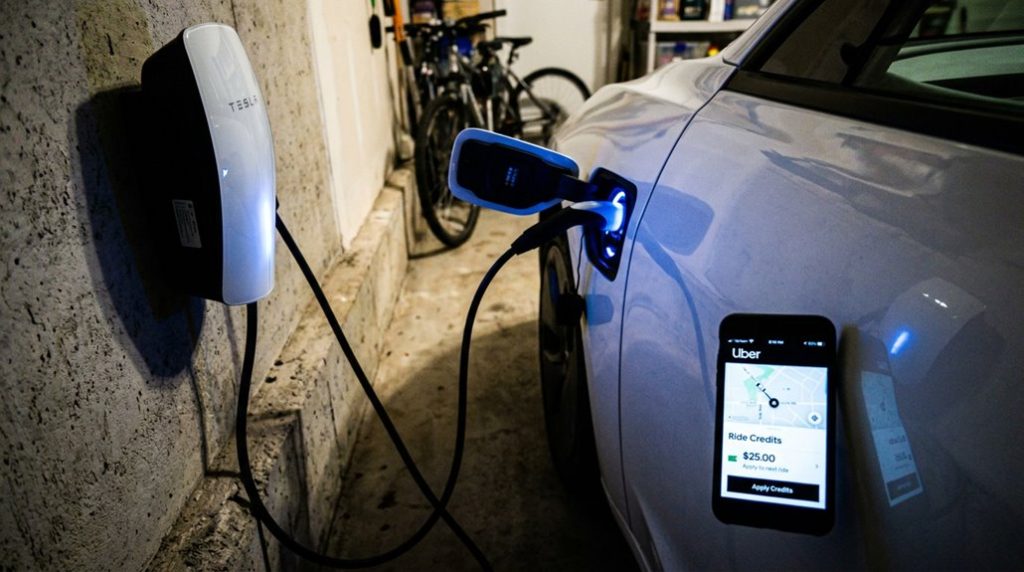
The displayed balance reflects whatever currency Tesla issued the credit in — no conversion, no exceptions. If the balance matches your expected service credit, you’re set.
If nothing appears, that’s a credit troubleshooting situation, not a redemption problem — meaning the credit likely hasn’t been loaded yet rather than being hidden elsewhere.
Also confirm you’ve got a backup payment method attached. Credits don’t always cover the full fare, and the app will charge the difference automatically. You can cross-reference your vehicle details and service history by checking your VIN on the touchscreen under the Controls menu to ensure your account is properly linked to the correct configuration.
How to Redeem Your Tesla Uber Credit in the App
Redeeming your Tesla Uber credit takes about thirty seconds once everything’s loaded correctly — but only if you know where to look. App versioning matters here; an outdated Uber app won’t display voucher options, so update first, then restart completely.
- Finally seeing that credit appear feels like finding money in an old jacket
- Tapping the wrong payment method wastes your ride budget — don’t let that happen
- Confirming the green checkmark before requesting gives you actual peace of mind
- Knowing exactly where to look eliminates that checkout panic entirely
- You earned this transportation support — use every dollar of it
For redeeming troubleshooting, open the app, enter your destination, and tap the current payment method at checkout. Select Uber Cash/Uber Credit from the list. If the voucher’s hidden, scroll to the bottom of payment options and toggle it on manually. Always keep a backup payment method linked. Tesla vehicles receive over-the-air software updates approximately once a month, so your service loaner period may coincide with a new firmware installation that temporarily suspends the vehicle and extends your need for Uber transportation.
Daily Caps, Usage Limits, and Expiration Dates
Once you’ve confirmed that credit is active and ready in the app, the next logical question is how far it actually stretches — and that’s where things get murky. Tesla doesn’t publish a universal daily cap, so you’re largely working with what your service advisor communicates at drop-off. That’s classic service variability in action.
Usage limits follow a similar pattern. Credits are tied to service-related travel (think: your home to the service center and back), not open-ended ridesharing. Short repairs under roughly four hours may not even qualify — loaners or credits typically kick in for longer, more interruptive visits.
Expiration ambiguity is equally frustrating. No standardized timeline exists in publicly available Tesla documentation, meaning your credits could expire same-day, post-repair, or after a fixed window — nobody’s publishing that officially. Your safest move: ask your advisor directly when those credits expire before your first ride. It’s also worth noting that Tesla’s over-the-air software updates can sometimes alter vehicle feature availability or service-related settings after your appointment is already complete, which may affect how credits or loaner policies are applied to your specific vehicle.
Do Tesla Service Credits Cover Rides Beyond the Service Center?
If you’re counting on your Tesla service Uber credits to fund a full day of errands across town, you’ll want to recalibrate those expectations fast. Tesla’s transportation support—when it’s offered at all—is tied to the specific service appointment itself, not a blanket mobility benefit that follows you wherever you need to go (think drop-off coverage, not a daily transit pass).
Daily mobility beyond the service center falls outside what Tesla’s credits are documented to cover, and community reports confirm that even service-related trips have sometimes been denied, making these credits far more situational than the term “courtesy transportation” implies. This is worth keeping in mind given that Tesla vehicles across all trims are increasingly segmented by feature tiers and subscriptions, meaning the level of ownership investment doesn’t necessarily translate into expanded service perks.
When your Tesla is in service, your phone quietly becomes your lifeline for Uber rides, service updates, navigation, and Tesla app access—and the last thing you want is to watch the battery drop right when you need it most. Stay powered through the entire day by keeping a high-capacity portable power bank so you’re never stuck hunting for a charger during pickup delays or long wait times.
Beyond Drop-Off Coverage
Many Tesla owners naturally wonder whether their Uber credit will stretch beyond a simple drop-off and pick-up loop around the service center — and the short answer is: probably not in any guaranteed way. These credits exist as a loaner substitute, not a long distance travel benefit. Remote reimbursement for unrelated trips isn’t Tesla’s published intent.
- You might feel shortchanged if you assumed the credit covered more
- Service centers apply credits inconsistently, which feels frustrating
- Expecting airport-level coverage sets you up for disappointment
- Uncovering the cap mid-ride creates genuine financial anxiety
- Knowing the limits upfront puts you back in control
For longer waits, Tesla owners with access to a nearby Supercharger network station may find it useful to know that the 75,000-plus connector locations worldwide are mapped in the Tesla app, making it easier to plan independently if your credit runs short. Ask your specific service advisor directly — because local policy, not corporate mandate, usually determines exactly how far your credit actually stretches.
Daily Mobility Limits
Knowing the boundary of your drop-off coverage is one thing — knowing whether that credit follows you through the rest of your day is another question entirely. It doesn’t.
Owner reports suggest Tesla’s rideshare assistance targets service distance specifically — getting you to and from the center — not covering incidental expenses like grocery runs or errands while your vehicle sits in the bay.
The reported daily cap (roughly $100, though unconfirmed universally) sounds generous until you realize it’s tied to repair-related travel only. Credits reportedly expire quickly, sometimes by the day after pickup.
Your local service center finally controls these terms, so ask directly before assuming broader coverage. Treat this as transport assistance, not a personal mobility subscription.
Frequently Asked Questions
Can I Use Tesla Uber Credits on Uber Eats Orders During My Visit?
Don’t count your chickens before they hatch—you can’t use Tesla’s Uber credits on Uber Eats. Restrictions apply, as credit limitations tie them to rides only, not meal delivery orders.
What Happens to Unused Tesla Uber Credits After My Car Is Ready?
You’ll likely lose your unused Tesla Uber credits once your car’s ready—most cancel automatically at pickup. Don’t count on post service refunds or credit expiration tracking; use them before collecting your vehicle.
Do Tesla Uber Credits Work if I Share My Uber Account With Someone?
Like a key that opens one specific lock, Tesla Uber credits tie to your account. With account sharing and family access, they may spend from the same balance, but credits aren’t transferable.
Can I Combine Tesla Uber Credits With Other Uber Promotions or Referral Cash?
You can’t combine Tesla Uber credits with stacked promotions or referral cash. Uber’s app auto-applies the maximum discount, and referral limitations mean Tesla’s service credits function independently from other Uber promotional balances.
Will Tesla Uber Credits Still Apply if I Reschedule My Service Appointment?
Rescheduling may affect your rescheduled eligibility for Uber credits, as Tesla decides case-by-case. Shorter or same-day visits often lose credit access. Watch for credit expiration dates, and confirm your updated appointment still qualifies with your service center.