
Tesla packs anywhere from eight to nine cameras into its vehicles — and the exact number depends on something most drivers never think to check. Hardware generation. HW3 and HW4 aren’t just software labels; they represent fundamentally different approaches to how Tesla sees the world around your car. The placement of each camera isn’t accidental either — it’s calculated. If you assumed all Teslas see the road the same way, you’d be wrong.
How Many Cameras Does a Tesla Have?
Depending on which hardware generation sits under your Tesla’s hood (metaphorically speaking), your car is running either 8 or 9 cameras total — a mix of exterior units handling everything from Autopilot perception to Sentry Mode surveillance, plus one cabin-facing camera mounted above the rearview mirror for driver monitoring.
Hardware 3.0 (HW3) vehicles deploy three front-facing cameras behind the windshield. Hardware 4.0 (HW4) trims that down to two, compensating with higher-resolution sensors. Some newer HW4-equipped models add a front bumper camera, pushing the total to 9. Exterior cameras cover the rear (above the license plate), sides (door pillars and fender mounts), and forward lanes. HW4’s cameras capture at 5MP resolution, compared to HW3’s 1.2MP sensors, delivering substantially sharper perception data for driving automation systems.
That cabin camera deserves specific attention — it raises legitimate privacy concerns and carries real regulatory implications depending on your region. Tesla stores cabin footage locally by default, releasing it only during safety events or when data sharing is explicitly enabled by you. Tesla’s owner manual specifically recommends periodic camera cleaning, as dirt, sap, or debris on any lens can degrade Autopilot and Full Self-Driving performance.
Tesla’s camera system captures everything from driving footage to Sentry Mode events, but that visibility only matters if the recordings are actually stored properly. Without reliable storage, important clips can disappear just when you need them most. A Tesla-compatible Sentry Mode dash cam USB/SSD storage drive helps ensure continuous, stable recording from all onboard cameras, keeping incident footage available for review.
Tesla Camera Count by Model: Model 3, Y, S, and X
Now that you know the total camera count varies by hardware generation, it helps to see how those numbers break down across specific models — because Tesla doesn’t run a one-size-fits-all sensor configuration.
The Model 3 and Model Y share nearly identical camera designer, typically landing at 9 cameras total when you include the cabin unit. That interior camera sits above the rearview mirror and handles driver monitoring — something software calibration keeps sharp over time. The Model S and Model X follow the same 9-camera structure post-2021 redesign, aligning with Tesla’s unified vision stack across its lineup.
Older vehicles (pre-HW3) carried fewer cameras overall, so your model year matters. HW4 hardware trims the front-facing count from three cameras down to two while improving resolution — a trade-off worth grasping. Regardless of generation, consistent lens maintenance across all exterior units keeps your Autopilot perception running as designed. The eight-camera arrangement is specifically designed so that overlapping fields of view compensate for any single blocked angle, ensuring continuous 360-degree coverage around the vehicle.
Where Every Tesla Camera Is Mounted
Knowing the camera count is one thing, but grasping where Tesla actually bolts each unit onto the car tells you far more about how the system perceives the world around it.
Knowing the camera count matters far less than understanding exactly where Tesla positions each one.
Your Tesla’s cameras occupy six distinct zones. Up front, a cluster sits behind the rearview mirror at the windshield’s top center, handling long-range lane detection and traffic sign recognition. A second forward camera mounts low on the front bumper fascia, covering close-range obstacles during parking.
Each front fender carries its own side camera, and additional units sit inside the door pillars (not the side mirror housing, as many assume), extending flanking coverage along the car’s full length. These overlapping fields of view create redundancy, ensuring the system maintains situational awareness even if one camera fails.
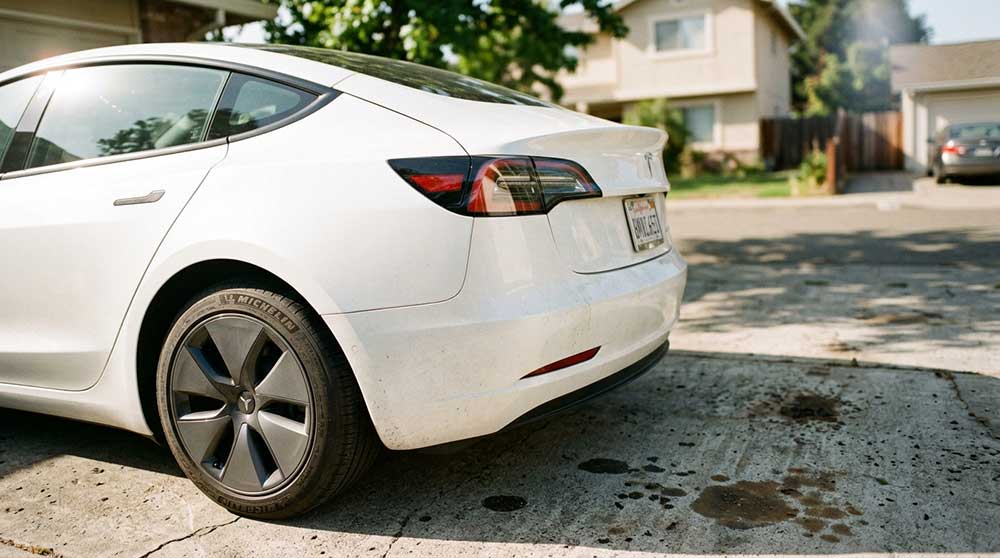
Finally, a rear camera mounts centrally above the license plate, providing your reverse visibility. Remarkably absent from this list: the trunk lid. Tesla routes rear sensing exclusively through that bumper-mounted unit rather than distributing hardware across the vehicle’s tail section. The raw visual data captured by all eight surrounding cameras feeds directly into onboard neural networks for real-time object detection, allowing the system to continuously identify lane markings, vehicles, and pedestrians.
Tesla’s camera system only performs as well as its visibility allows—yet road grime, dust, and rain buildup can quietly reduce clarity across the front, side, and rear lenses without you noticing. An automotive camera lens cleaning kit helps keep all exterior Tesla cameras clear and unobstructed, supporting more accurate detection, sharper Sentry Mode recordings, and consistently reliable visual input for day-to-day driving.
How Hardware 4 Changed Tesla’s Camera System
Grasping where those cameras sit is only half the story — the hardware generation running behind them matters just as much. Tesla’s HW4 system dropped the total camera count from nine to eight but simultaneously upgraded each sensor from 1.2 megapixels to 5 megapixels — roughly a 4x resolution jump. You’re trading quantity for quality, and the math works out heavily in your favor.
HW4 optics also brought redesigned housing with improved thermal management, including heating elements around the B-pillar cameras (a practical fix for cold-weather fogging). The front-facing cluster was restructured into a dual-camera arrangement that actually delivers wider, clearer coverage than its predecessor. The Cybertruck, which uses HW4 as its baseline system, pairs this camera architecture with a 48-volt electrical architecture that supplies cleaner, more efficient power distribution to onboard electronics than a conventional 12-volt system would allow.
Software caught up eventually. FSD v13.2.1 was reportedly the first version processing native HW4 resolution rather than emulating HW3 behavior by downscaling inputs. Dashcam recordings reflect that shift too — front-camera files now reach 2896×1876 resolution, though storage consumption climbs approximately 30% higher. HW4 is manufactured by Samsung on a 7nm process, which underpins the chip’s ability to handle the significantly increased data throughput that higher-resolution cameras demand.
What the Interior Cabin Camera Does
Tucked just above your rearview mirror, the cabin camera‘s primary job is keeping you honest while Autopilot or Full Self-Driving is active — it monitors your eye direction and head position to confirm you’re staying focused on the road ahead.
When it detects inattentiveness, the system triggers audible alerts designed to snap your attention back where it belongs, not to report you to Tesla HQ.
All of that processing happens on-vehicle by default, meaning your image data stays local unless you’ve explicitly enabled data sharing (and even then, only qualifying safety events — like a collision — trigger any transmission). Beyond privacy considerations, Tesla can also use aggregated cabin camera data to demonstrate Autopilot safety to regulators and courts by comparing accident rates between attentive and inattentive drivers.
The camera feed itself is viewable remotely through the Tesla app when Sentry Mode or Dog Mode is active, though accessing that live view requires an active Premium Connectivity subscription on your account.
Driver Monitoring Purpose
Attention is the currency Autopilot demands from you every second it’s engaged, and Tesla’s cabin camera is the enforcement mechanism making sure you’re paying up.
When Autopilot or Full Self-Driving is active, the camera monitors your gaze direction and detects driver attention lapses almost instantly. Look away too long, and you’ll hear an audible alert pulling your focus back to the road. It’s not subtle, and it’s not supposed to be.
The privacy implications here are worth noting, though. Tesla states the camera doesn’t perform facial recognition or stream footage externally by default. It’s watching your alertness, not your identity. Data sharing requires your explicit opt-in, keeping the monitoring focused strictly on safety rather than surveillance (an important distinction most people overlook entirely). Unlike traditional vehicles that rely on mechanical tune-ups to update vehicle behavior, Tesla delivers safety patches and calibrations remotely overnight via Wi-Fi, meaning the systems governing how the cabin camera interacts with Autopilot can be refined without ever visiting a service center.
Safety And Automation
While most people fixate on Tesla’s exterior camera array, the cabin camera sitting above your rear-view mirror is doing equally serious work on the inside. When Autopilot or Full Self-Driving is active, it monitors driver attention continuously, triggering audible alerts the moment your focus drifts from the road. Think of it as a co-pilot that never blinks.
Cabin privacy is handled carefully here. By default, no footage leaves the vehicle, nothing gets saved to onboard storage, and Tesla doesn’t associate the data with your VIN. Processing happens entirely on-device. The only exception is event-based sharing during safety-critical incidents (like collisions), and only if you’ve enabled data sharing. It’s a tightly scoped system built around safety automation, not surveillance. This same commitment to onboard processing mirrors how Tesla handles other vehicle systems, including the battery preconditioning that engages automatically when navigating to a Supercharger, keeping sensitive operational data processed locally on the vehicle.
What Tesla’s Cameras Can See and How Far
Now that you know what’s watching inside the cabin, let’s talk about what Tesla’s cameras actually see beyond the glass—and how far that vision reaches.
Your front-facing telephoto camera pushes detection out to roughly 250 meters, while the main forward camera covers about 150 meters, and the wide-angle lens handles the messy close-range geometry at intersections and tight curves where things get complicated fast.
Tesla’s camera array collectively builds a 360-degree image of your surroundings, identifying lane markings, vehicles, pedestrians, and road edges in real time—all without radar, because Tesla Vision has replaced traditional radar-based sensing with pure camera-and-AI perception in most current models. This same onboard intelligence works alongside the battery management system, which uses real-time BMS negotiation with Supercharger stations to optimize power delivery based on what the vehicle’s systems detect about current conditions.
Camera Coverage Range
Spread across the body of every modern Tesla are eight exterior cameras working in concert to build a near-360-degree image of the world around the car.
The front camera operates with roughly a 40° narrow angle but reaches objects up to 250 meters away.
Side cameras cover approximately 75–90° and extend visibility to 400–600 feet laterally.
The rear camera widens to around 135°, handling reversing and incident recording simultaneously.
Unlike night sensitivity tools or thermal imaging, Tesla’s cameras rely entirely on visible light, meaning lighting conditions directly affect range.
Coverage isn’t binary — closer objects appear sharper while distant ones gradually lose detail.
Weather, object size, and camera position all compress or extend what the system practically detects at any given moment.
This camera-based perception system is central to every Tesla, from the Model X’s panoramic windshield design to the more compact Model Y, where the same eight-camera layout operates despite the smaller body.
Object And Lane Detection
Lane detection reads road geometry in real time, feeding steering control and path planning continuously. Near-field awareness handles the trickier stuff — parking, tight maneuvers, curb avoidance — though low-lying objects near camera blind spots remain a known challenge.
Visibility limits matter enormously here. Dirty lenses, heavy rain, glare, or faded lane markings all degrade detection quality, and Tesla’s software will actually warn you when conditions compromise perception. Clean cameras aren’t optional; they’re functionally critical to how accurately the system reads your surroundings. Any accessory or film applied near camera housings should be verified for sensor and camera compatibility to avoid obstructing the fields of view the vision system depends on.
Replacing Radar With Vision
Tesla made a calculated bet when it stripped radar — and later ultrasonic sensors — out of newer Model 3 and Model Y builds, leaving cameras as the sole sensory input for everything from highway route guidance to parking. That’s radar elimination in its most complete form, and it forced Tesla Vision to carry serious weight. Without sensor fusion blending radar’s direct range data with camera imagery, the system now infers distance purely through visual geometry and neural-network processing.
Forward cameras reportedly reach up to 250 meters (narrow view), while wide forward coverage drops to roughly 60 meters. The trade-off? Cameras struggle in fog, glare, and low-light conditions where radar previously compensated. Close-range parking perception remains the hardest problem camera-only systems still haven’t fully solved.
How Many Cameras Do the Cybertruck and Semi Have?
Regarding two of Tesla’s most unconventional vehicles, the camera counts tell very different stories. The Cybertruck runs nine cameras total — eight external, one cabin — with camera placement spanning the tailgate, door pillars, windshield, front wheel wells, and a bumper-mounted front camera. That last position is genuinely unusual compared to older Tesla models, giving the Cybertruck a broader forward field of view. The cabin camera sits above the rearview mirror, monitoring driver attentiveness and supporting Forward Collision Warning.
The Semi’s situation is murkier. Tesla uses a multi-camera vision suite on the Semi, consistent with its broader fleet variations across commercial and consumer lines, but exact camera counts aren’t explicitly documented in publicly available materials.
Given the Semi’s highway-focused role, forward and side visibility are especially critical. Confirm the specific count directly against current Tesla Semi documentation before drawing hard comparisons between these two distinctly different vehicles.
Frequently Asked Questions
Can Tesla Cameras Record Footage and Save Video Clips Locally?
Yes, your Tesla’s cameras can record and save video clips locally to a USB drive. With dashcam privacy and footage ownership fully in your hands, you’ll capture crisp, timestamped evidence stored right in your vehicle.
Do Tesla Cameras Work in Complete Darkness or Low-Light Conditions?
Your Tesla’s cameras don’t have night vision or infrared sensitivity, so they struggle in complete darkness. They work best with ambient light from streetlights or headlights to detect lanes and obstacles reliably.
Are Tesla Cameras Covered Under Warranty if They Malfunction or Break?
Yes, Tesla’s warranty covers camera malfunctions caused by defects in materials or workmanship. You’re protected for 4 years or 50,000 miles, though physical damage isn’t covered. Check warranty transfer terms and potential deductible costs before filing a claim.
Can Third Parties or Hackers Access Tesla Camera Feeds Remotely?
Hackers can’t waltz into your Tesla’s camera feeds without stealing your credentials first. Remote breaches are possible through phishing or account takeover, exposing you to serious legal liability. Secure your account with two-factor authentication.
Does Tesla Use Camera Data to Train Its Autonomous Driving AI?
Yes, Tesla uses your camera footage to build its AI training datasets. When you drive, you’re contributing real-world clips that carry privacy labels, helping improve Tesla’s autonomous driving perception models.