
Every EV charger plug looks the same until it doesn’t fit. NACS—the connector Tesla built and the industry quietly adopted—is reshaping how North America powers its electric vehicles. It’s the USB-C moment EVs desperately needed, but there’s a catch most drivers never see coming. When your car, the charging network, and the hardware aren’t speaking the same language, things get complicated fast. Here’s what NACS actually means for your EV experience.
What Is NACS and Why Does It Matter for EV Drivers?
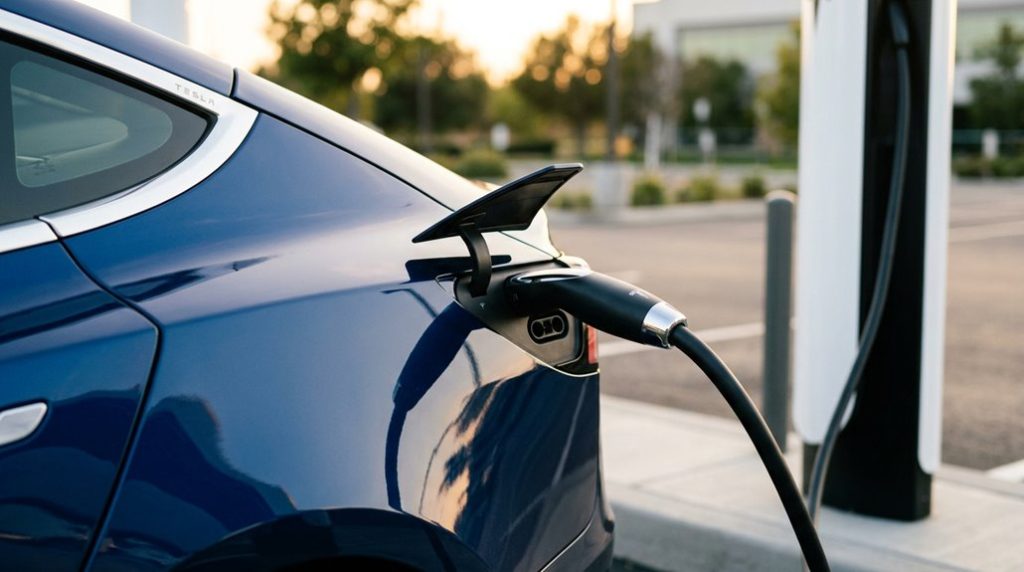
If you’ve spent any time around the EV charging conversation lately, you’ve probably heard NACS come up — and for good reason. NACS stands for North American Charging Standard (also formalized as SAE J3400), and it’s the connector Tesla has used on its vehicles since 2012. In November 2022, Tesla opened the design to the broader industry, and major automakers moved quickly to adopt it.
Why does this matter to you? One compact connector now handles both AC and DC fast charging. That simplicity reshapes range psychology — fewer adapter worries means you approach charging stops with more confidence and less mental overhead. It also improves charging etiquette at busy stations, since a unified plug format reduces the awkward plug-incompatibility shuffle everyone’s experienced. Non-Tesla EVs can now access 17,800+ Tesla Superchargers across North America using a dedicated NACS adapter, dramatically expanding the practical charging network for all EV drivers.
NACS isn’t eliminating CCS or J1772 overnight. The shift takes years. But it’s clearly becoming North America’s dominant charging path — and grasping it puts you ahead of the curve. For drivers who encounter access issues while researching charging options online, sites protected by Cloudflare security may occasionally block users based on certain browsing actions or data submissions.
As charging standards continue to evolve, relying on a single network can leave you with fewer options when you need a charge most. A NACS to CCS Charging Adapter gives your Tesla access to a wider range of fast-charging stations, making road trips simpler and reducing the chances of being stuck waiting for the next compatible charger.
How NACS Works: Pins, Power Limits, and Physical Design
Power limits aren’t set by connector shape alone — your vehicle, charger, cable design, and thermal monitoring all manage the final number together. The single compact connector supports both AC and DC charging through shared pins, eliminating the need for separate connectors for different charging modes. Modern EV charging systems increasingly rely on 48-volt electrical architecture to deliver equivalent power at reduced current, enabling thinner wiring and less resistive heat loss throughout the vehicle.
Which EVS Come With Native NACS Ports Right Now?
The list of EVs leaving the factory with a native SAE J3400 port is growing faster than most people expected, but it’s still far from universal. Regional availability varies, and trim-level exceptions mean you can’t assume an entire brand has switched. Check your specific model year before skipping the aftermarket adapters drawer.
| Brand | Native NACS Model | Model Year |
|---|---|---|
| Tesla | Model Y, Model 3, Cybertruck | 2024–2025 |
| Hyundai | Ioniq 5 | 2025 |
| Kia | EV6, EV9 | 2025–2026 |
| Rivian | R1T, R1S | 2026 |
| Lexus | RZ, ES | 2026 |
Genesis, GM (Cadillac Optiq), Toyota, and Subaru round out the 2026 wave. Ford and Nissan have announced shifts, but factory ports aren’t universally available yet. Native NACS means the port ships from the factory—not that someone handed you an adapter at the dealership. For CCS-equipped vehicles not yet on this list, approved NACS-to-CCS adapters like the UL 2252-certified Vortex Plus still unlock access to more than 23,500 Tesla Supercharger stalls across North America. Tesla’s Supercharger V4 network is expanding globally, bringing faster speeds and broader compatibility that makes native NACS access increasingly valuable for long-distance travel.
As NACS adoption grows, charging flexibility matters more than ever. A Tesla J1772 Charging Adapter gives you access to thousands of public Level 2 chargers that would otherwise be off-limits, turning more parking lots, hotels, workplaces, and shopping centers into convenient charging opportunities when you need them.
NACS vs. CCS1: Which Charging Standard Wins in Practice?
When you stack NACS against CCS1, three factors cut through the noise fastest: connector design, raw charging speed, and where you can actually plug in today.
NACS runs a compact 5-pin connector that handles both AC and DC through the same pins, while CCS1 bolts a separate DC section onto the bottom of a standard J1772 plug — a combo design that works fine but adds bulk you’ll notice every time you’re maneuvering a heavy cable in a cramped parking spot.
On paper, CCS1 tops out around 350 kW at the fastest current North American stations, while NACS hardware references now cite theoretical ceilings approaching 1 MW, and the Supercharger network‘s rapid expansion means NACS is increasingly where the charging access actually lives. The V4 Supercharger cabinet architecture supports up to 1,200 kW in Semi deployments while distributing regulated high-voltage DC across up to eight dispensers from a single modular unit.
The reliability gap between the two standards is just as telling — CCS networks have historically reported uptime of 70–85%, while the Tesla Supercharger network consistently holds above 99% due to its tightly integrated vehicle, software, and hardware ecosystem.
Connector Size and Design
Size matters in EV charging, and NACS wins that fight without much of a contest. At roughly 42.8 mm × 45.7 mm, it’s genuinely compact — about half the size of CCS1. That smaller footprint supports cleaner compact aesthetics on body panels and simplifies port integration without sacrificing thermal management capability.
Here’s what that size difference means practically:
- Five-pin shared layout — two large power pins handle both AC and DC, keeping the housing slim
- Smaller inlet cutouts — less intrusion into surrounding bodywork
- Lighter cable assembly — easier to handle during repeated public charging sessions
- Reduced hardware complexity — fewer port-door mechanism requirements
CCS1 isn’t obsolete, but its bulkier design reflects an older engineering philosophy that NACS simply outgrew. Tesla’s own vehicle design philosophy mirrors this compactness, with the Model 3 and Model Y integrating a 15.4-inch touchscreen into a minimal body panel footprint that similarly prioritizes clean aesthetics over hardware bulk.
Charging Speed Compared
Compact design earns NACS real points on ergonomics and panel integration, but it doesn’t automatically buy you faster charging — and that’s where a lot of EV shoppers get tripped up.
CCS1 stations commonly deliver up to 350 kW; NACS Superchargers typically top out around 250 kW. On paper, CCS1 wins.
In practice, your battery chemistry sets the real ceiling. If your car accepts 150 kW maximum, both connectors deliver exactly that. Neither standard rewrites your vehicle’s physics.
What actually shapes session speed is battery temperature, state of charge, and site hardware quality — not plug shape. Good charging etiquette (precondition your pack, arrive below 80%) maximizes any session regardless of standard. Connector choice rarely determines the outcome; your battery does. Tesla’s built-in trip planner goes a step further by preconditioning the battery before Supercharger arrival, actively warming or cooling the pack to its optimal charge-acceptance temperature so you spend less time plugged in.
Network Access Today
Plug shape only matters if the network behind it’s worth reaching, and right now that’s where NACS is pulling ahead in a meaningful way. Tesla’s Supercharger footprint gives NACS users a dense, reliable infrastructure that CCS1 networks still struggle to match on network reliability and payment interoperability.
Here’s how access breaks down today:
- NACS users tap into Tesla’s extensive Supercharger grid plus growing third-party support.
- CCS1 users rely on EVgo and Electrify America, which cover ground but vary in consistency.
- Cross-standard adapters let both sides reach the other network, though not always seamlessly.
- New charger rollouts increasingly favor NACS or dual-standard hardware, signaling where investment flows.
Your connector choice is fundamentally a bet on which infrastructure keeps evolving. For Chevy Equinox EV owners specifically, a NACS adapter unlocks access to over 17,800 Tesla Superchargers, substantially expanding charging options beyond CCS1-only networks.
Tesla Superchargers, Third-Party Networks, and NACS Access
Because Tesla built NACS from the ground up as both a physical connector and a communication protocol, it carries a significant structural advantage: Tesla’s Supercharger network accounts for three out of four fast chargers across North America, meaning any EV that speaks NACS natively is already plugged into the continent’s most dominant charging infrastructure without needing a converter.
Tesla interoperability extends further than Tesla’s own network. ChargePoint and Electrify America are both expanding NACS availability, so your access grows as the standard matures. Use app filtering in Tesla’s map or your brand’s app to surface only compatible stations before you leave the driveway. Tesla’s vehicles rely on eight surrounding cameras feeding raw visual data into onboard neural networks, the same sensor architecture that enables features like Traffic Light and Stop Sign Control to detect signals at up to roughly 600 feet under good conditions.
| Brand | Adapter Required | App Used |
|---|---|---|
| Tesla | No | Tesla App |
| Ford | Yes | FordPass |
| GM | Yes | myChevrolet |
| Rivian | Yes | Rivian App |
| Hyundai | Yes (complimentary) | Hyundai App |
What Happens If Your EV Doesn’t Have a Native NACS Port?
If your EV still runs a CCS1 inlet instead of a native NACS port, you’ll need an approved adapter to plug into Tesla Supercharger hardware — and just having the physical hardware isn’t enough, because your vehicle’s software must also authorize the session before any power flows.
The adapter reroutes both the charging pins and communication signals between the NACS cable and your CCS inlet, so the whole handshake happens correctly (think of it as a translator between two charging languages).
Curiously, some 800-volt EVs like the 2025 Hyundai Ioniq 5 actually charge faster through a CCS adapter — 10% to 80% in roughly 20 minutes — than they do natively on NACS-equipped Tesla hardware, which clocks in closer to 30 minutes, proving that adapter-based access isn’t always the inferior option. When selecting a third-party adapter, using a non-certified charger carries targeted warranty denial risk for the affected charging system, so verifying that any adapter meets manufacturer approval standards before purchase is worth the extra step.
Using NACS Adapters
Not every EV rolls off the lot with a native NACS port, and that gap doesn’t have to strand you at a Tesla Supercharger. Authorized converters bridge that mismatch cleanly, but you’ll need to use them correctly.
Installation workflow matters:
- Installation workflow — Attach the converter to the charger cable first, then insert it into your vehicle’s port.
- AC limitations — DC fast-charge converters don’t work at Destination Chargers or home Wall Connectors; grab a J1772 converter for those.
- Adapter safety — Inspect for visible damage before every session; a damaged connector invites charging interruptions.
- Warranty risks — Third-party converters can void manufacturer coverage; Rivian, GM, and Ford each authorize only their own branded hardware.
Tesla’s Universal Wall Connector includes J1772 compatibility for mixed-EV households, making it a practical home charging option even if your daily driver isn’t a Tesla.
Software Authorization Requirements
Plug shape gets you to the door, but software is the one holding the key. Even with a compatible converter installed, your EV won’t charge unless your automaker has enabled access through firmware updates and Tesla network approval — that’s software gating in practice.
On Tesla vehicles, you can verify this under Software → Additional Vehicle Information, where “CCS and 3rd-party NACS DC charging” shows either “Enabled” or “Not Installed.” If it shows “Not Installed,” a manufacturer retrofit is required before fast charging works.
Some automakers (Mercedes-Benz, especially) also manage account permissions directly through their apps, requiring you to toggle on NACS DC adapter authorization manually. Hardware without authorization accomplishes nothing.
Compatibility is finally a three-layer equation: physical connector, firmware enablement, and network approval.
Future Port Upgrades
For the majority of EV owners driving CCS-equipped vehicles today, the answer to “what do I do without a native NACS port?” is straightforward: you adjust, literally. Retrofit feasibility for existing models is effectively zero at the consumer level, since port layout ties directly into body structure, wiring looms, and onboard charging electronics.
Here’s what actually shapes your situation:
- Manufacturer-approved adapters remain your primary bridge to NACS-compatible hardware
- Native NACS ports typically appear only on refreshed platforms or 2025+ model years
- Future proofing costs factor into resale value when comparing adapter-dependent vehicles against native-port models
- Fleet and service-level retrofits exist, but aren’t practical consumer options
Carry your adapter, plan around it, and evaluate native-port timing before your next purchase.
How to Charge Faster and Avoid Common NACS Mistakes
Getting the most out of NACS charging comes down to matching the right charger to the right situation—and not making the kind of avoidable mistakes that quietly kill your charging speed. Use DC fast charging when time matters; AC Level 1 simply can’t compete. Battery preconditioning before arriving at a Supercharger—especially in cold weather—keeps your pack in the optimal temperature window for peak power delivery. Keep adapter maintenance consistent; a damaged or underrated adapter causes power derating or failed sessions entirely.
| Mistake | Why It Hurts | Fix |
|---|---|---|
| Charging above 80% | Tapering reduces speed markedly | Stop at 80% on road trips |
| Wrong adapter type | Incompatible sessions or no charge | Verify AC vs. DC rating first |
| Skipping preconditioning | Cold battery limits charge rate | Enable it via route guidance |
| Low-output charger | Caps power below vehicle’s maximum | Match charger to vehicle specs |
Frequently Asked Questions
Will NACS Eventually Replace J1772 for Standard AC Home Charging Entirely?
NACS will likely replace J1772 as market adoption accelerates and regulatory alignment pushes automakers toward a unified connector, but you shouldn’t expect a complete phaseout anytime soon—it’s a gradual multi-year shift.
Does NACS Connector Wear Out Faster Due to Its Shared AC and DC Pins?
Like a well-worn key, shared pins don’t automatically fail faster. Your NACS connector’s contact wear and pin corrosion depend more on build quality, thermal management, and how carefully you handle it.
Are NACS Adapters Covered Under Any EV Manufacturer Warranty Programs?
Yes, some EV manufacturers cover NACS adapters under limited warranties, but you’ll want to check warranty transferability restrictions and adapter compatibility requirements, as coverage typically only protects the original purchaser against defects in materials or workmanship.
Can NACS Support Bidirectional Vehicle-To-Grid Charging in Current Implementations?
Like a telegraph wire carrying news cross-country, NACS can’t yet fully support bidirectional vehicle-to-grid charging. You’ll find today’s implementations lean on proprietary systems, not open standards, though vehicle-to-home and smart aggregation use cases are actively emerging.
How Does NACS Perform in Extreme Cold or Hot Weather Charging Conditions?
NACS handles extreme temperatures well as a connector, but your battery’s cold performance and thermal management system do the real work—preconditioning before charging sessions helps maintain peak speeds in both freezing and scorching conditions.