
Most EV drivers chase Superchargers like they’re the only option—but Tesla’s Destination Chargers are doing the quiet, unglamorous work that actually fits your life. Hotels, restaurants, parking garages: these Level 2 connectors are already where you’re headed. The catch? Finding them isn’t as intuitive as it should be, and the methods differ wildly in speed, accuracy, and detail. There’s more than one right answer, and knowing which approach suits your situation makes all the difference.
Find Tesla Destination Chargers on Your In-Car Map
Tesla’s in-car touchscreen is your first stop for locating Destination Chargers, and it’s more capable than most owners realize. Start by tapping the search bar, then select the Charging option. The map populates immediately with pins representing various charging locations, sorted by proximity in the side panel list.
Here’s where map filters become essential. By default, the display often prioritizes Superchargers, so you’ll need to manually adjust the filter settings to surface Destination Chargers — typically Tesla Wall Connectors installed at hotels, restaurants, and parking garages. Third-party stations are also hidden by default and require separate activation.
Once you spot a relevant pin, tap it. The pin details panel reveals critical information: stall count, usage restrictions, available amenities, and predicted availability. You can steer directly from that view or save the location as a favorite for future reference. Destination Chargers use AC Level 2 power, making them best suited for multi-hour stays such as overnight stops at hotels or extended restaurant visits. Tesla operates 2,896 EV chargers across the UK, spread across 485 locations, giving drivers a wide pool of destinations to plan routes around. Simple, but easy to overlook without knowing where to look.
Use the Tesla App to Find Destination Chargers Near You
Your in-car map does the heavy lifting when you’re already behind the wheel, but the Tesla app gives you the same search capability from your couch, hotel lobby, or wherever you’re planning your next move before you even get in the car. Open the app and go to the charging section to browse nearby options.
Here’s how to work through it efficiently:
- Search by location — Browse charging options tied to your current or planned place.
- Filter results carefully — Destination Chargers (Level 2, up to 44 miles of range per hour) may appear less prominently than Superchargers.
- Check venue details — Listings often include hotel or restaurant surroundings, helping you plan stops intelligently.
Be aware of app limitations, though. User permissions and app version can affect what’s visible. Accessing live charging data through the app also depends on your Premium Connectivity subscription status, which you can verify directly from your vehicle via the Software menu.
If results seem thin, cross-reference with PlugShare or Tesla’s route guidance system directly. A third-party option like Supercharger map for Tesla also surfaces Destination Charger locations alongside real-time stall availability and amenity details for nearby stations.
Use Tesla’s Website to Look Up Destination Charger Locations
Beyond the app, Tesla’s website gives you a dedicated Destination Charging directory that you can browse from any browser without touching the car or your phone. Site searchability is straightforward — filter by country, state, city, or specific property name to narrow results fast.
| Search Filter | Example Input | Result Type |
|---|---|---|
| Country | United States | National directory view |
| State | California | State-level property list |
| City | Tucson | Local destination listings |
| Property Name | Embassy Suites | Specific hotel chargers |
| Region Type | Rural or urban | Area-based results |
Filter options let you zero in on hotels, resorts, and restaurants hosting Wall Connectors — Tesla’s 40,000-plus strong Destination Charging network. Each listing surfaces the property name, address, and sometimes a phone number (handy for confirming availability before you arrive). Unlike Superchargers, these locations prioritize extended parking stops, not quick turnarounds. Unlike Destination Chargers, Superchargers use offboard AC-to-DC rectification to deliver power directly to the battery pack, enabling the rapid turnaround times that roadside corridor charging demands. The network spans 5,114 charging locations globally, giving drivers a broad range of destination options to plan around before ever leaving home.
Find Tesla Destination Chargers on PlugShare and Other Apps
Tesla’s own website is a solid starting point, but PlugShare fills in the gaps with real-world community data — user-uploaded photos, honest reviews, and connector-level detail that no official map bothers to include.
Pull up PlugShare’s dedicated Tesla destination charging map, apply the “Hide Restricted Locations” filter, and you’ll immediately cut out the private-access dead ends (those “Guests Only” listings that look promising until they aren’t). With over 130,000 chargers across the United States, cross-referencing PlugShare against Tesla’s native map significantly reduces the chance of arriving at a location that no longer fits your needs.
Third-party apps like PlugShare and ABRP complement Tesla’s native tools by letting you cross-reference charger availability, property access rules, and connector compatibility before you commit to a detour. When building a route, you can also set a search radius in miles or kilometers to control how far off your path PlugShare looks for charging options.
Even when you successfully find a Tesla Destination Charger, it’s easy to assume you’ll be able to plug in—until you realize many locations still use J1772 connectors and you’re left without compatibility. A Tesla J1772 Charging Adapter ensures that once you arrive, you can actually charge, turning mapped charging spots into reliable power stops instead of missed opportunities.
Using PlugShare for Tesla
PlugShare fills in the gaps that Tesla’s own tools sometimes leave open, functioning as a community-sourced map packed with charger photos, user check-ins, and access notes that no official app consistently replicates. Community tips from verified users often surface details Tesla’s listings quietly omit.
Use PlugShare effectively with this workflow:
- Search your destination city using map overlays filtered specifically for Tesla connector types.
- Apply access filters to separate public locations from restricted guest-only chargers.
- Review recent check-ins and photos to confirm the charger is operational and accessible.
One catch: PlugShare data ages. A charger listed as available six months ago may now require a hotel key card. Always cross-reference against Tesla’s official Destination Charging page before committing. For longer highway trips, Tesla’s onboard navigation remains the stronger tool since it preheats the battery before Supercharger stops to optimize charging efficiency and stop intervals.
Third-Party App Benefits
While PlugShare leads the pack, it’s not the only third-party tool worth keeping in your charging toolkit. Apps like ChargeHub aggregate multiple networks simultaneously, resolving privacy concerns around account-gated stations by flagging restricted access upfront. Data accuracy improves when several platforms cross-reference the same location. When comparing charging station data across apps, documenting your findings with screenshots and notes follows the same documentation best practice that helps Tesla owners defend warranty claims and navigate service disputes.
| App | Key Benefit |
|---|---|
| PlugShare | Community-verified reviews and photos |
| ChargeHub | Multi-network aggregation |
| A Better Route Planner | Route-optimized charging stops |
| Plugsurfing | Cross-network access management |
| Open Charge Map | Open-source station database |
Each tool fills a different gap. You’ll want route optimization for long trips, real-time community input for outage alerts, and compatibility filters for connector-specific searches. Using two or three apps together beats relying on any single source.
What Is Tesla Destination Charging?
How does Tesla keep your battery topped up while you’re busy doing something else entirely? Destination charging is Level 2 infrastructure installed at hotels, restaurants, and resorts — places where you’re already parked for hours. Unlike Superchargers built for quick en-route stops, these chargers reward patience with battery preservation through steady, gentle AC charging.
Destination charging turns downtime into range — steady, gentle AC power working quietly while you’re already somewhere worth being.
Here’s what makes destination charging practical:
- Speed: Delivers 30–44 miles of range per hour at 240 volts, making overnight strategies genuinely effective.
- Hardware: Most locations use Tesla Wall Connectors, the same reliable units designed for home installation.
- Cost: Many venues offer free access for guests, though parking fees or eligibility rules may apply.
Charging etiquette matters here — don’t hog a connector longer than necessary. Hotel etiquette extends to charging spots too. Treat shared infrastructure respectfully, and everyone benefits. For long trips, pairing destination charging overnight with a Supercharger V4 network stop during the day helps maintain battery health while keeping your travel schedule on track.
How to Connect and Start Charging at a Destination Site
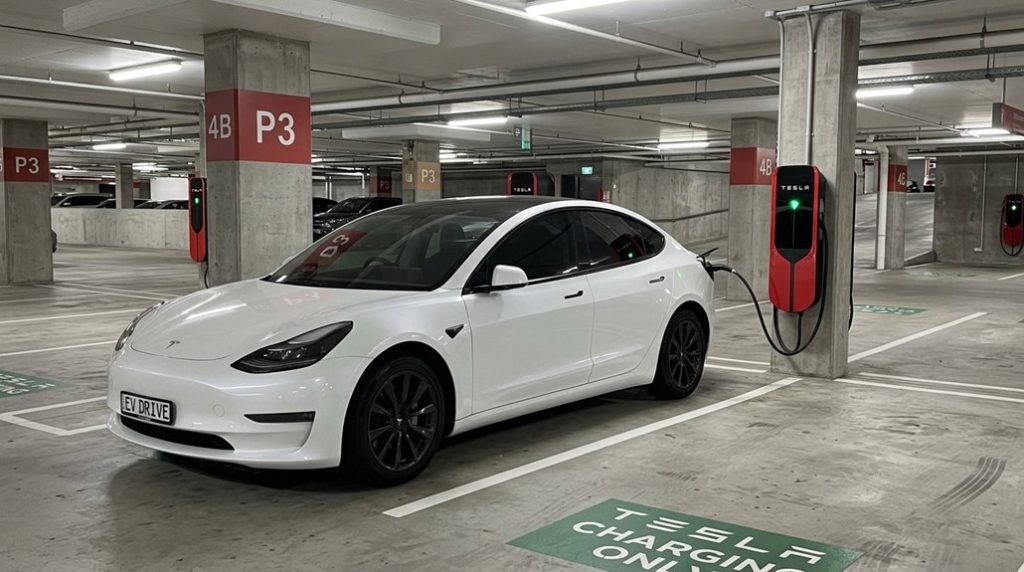
Once you’ve tracked down a Tesla Destination Charger and confirmed you’re actually allowed to use it, the physical connection is almost anticlimactic — park, open your charge port, plug in the Wall Connector, and most Tesla vehicles (Model 3, Y, S, and X built after 2019) start pulling current automatically without any app interaction.
Non-Tesla drivers follow a slightly longer path through the Tesla app‘s “Charge Your Non-Tesla” flow, using a J1772-to-Tesla or TeslaTap-style adapter to bridge the connector gap before initiating the session.
Once charging is active, you’ll monitor progress through the Tesla app, which surfaces real-time session data and connection status, though the charger’s indicator light (green for active on most units) gives you a fast visual confirmation that the handshake between vehicle and station succeeded at 208–240V AC, meaning you’re looking at Level 2 speeds — capable but not Supercharger-fast, so plan for a few hours rather than a few minutes. It’s also worth noting that hardware limitations on older vehicles can restrict which software features are available to you during a charging session, so owners of earlier Tesla models may find certain app-based monitoring or control features absent.
Connecting to the Charger
Arriving at a Tesla Destination Charger is satisfying — but the last ten feet matter as much as the last hundred miles. Cable management isn’t glamorous, but a taut cable under tension risks connector damage. Position your car so the cable reaches the port comfortably.
Here’s what to do once you’re parked:
- Open your charge port via the touchscreen, Tesla app, or by pressing the port door directly.
- Insert the connector firmly until it clicks — a loose connection causes a failed handshake and zero charging.
- Verify charging started on your dashboard display before walking away.
Tesla’s over-the-air software updates can modify charging behavior and unlock features on your vehicle even after you’ve driven it off the lot, so keeping your car updated ensures you’re getting the most from every charging session.
Non-Tesla drivers, practice proper adaptor etiquette — confirm site permissions first, then connect using your compatible adaptor. The car confirms success. Trust it.
Finding a Tesla Destination Charger is only half the problem—arriving and realizing it’s occupied or out of reach can still leave you scrambling for power in unfamiliar places. A Portable NACS Level 1 / Level 2 EV Travel Charger gives you a reliable backup option, so even when destination charging doesn’t go as planned, you can still plug in and keep your trip moving without unnecessary delays.
Monitoring Your Charging Session
Plugging in is only half the job — the other half is confirming the session actually started. Check your charge port LED immediately; a flashing green light means energy is flowing. Open the Tesla app for live session details, including kilowatts delivered and estimated completion time. Your touchscreen reinforces this, displaying current power draw and projected range added. These overlapping confirmation points matter for session troubleshooting — if nothing updates within two minutes, something’s wrong.
Non-Tesla stations occasionally require app activation before energy billing begins, so don’t assume connection equals charging. Destination Charging delivers Level 2 AC speeds (slower than Superchargers), so expect gradual progress measured in miles-per-hour rather than minutes. Monitor periodically; charging estimates adjust as battery temperature and state of charge shift throughout the session. Keep in mind that cold temperatures below freezing can cause a 20–30% range reduction, meaning your session’s projected range added may read lower than expected in winter conditions.
Frequently Asked Questions
Can Non-Tesla EVS Use Tesla Destination Chargers With an Adapter?
Yes, you can — but it’s not guaranteed. With third-party adapters and proper charging etiquette, you’ll access some Tesla Destination Chargers, though station permissions finally decide your fate.
Do Hotels Charge Extra Fees for Using Their Destination Chargers?
Yes, many hotels do charge extra fees, but hotel policies vary widely. Always ask upfront about fee transparency—costs can include per-kWh rates, hourly charges, parking fees, or flat nightly access fees.
How Many Miles of Range Does an Overnight Destination Charge Typically Add?
Overnight charging typically adds 180–240 miles of range gain. Park for 6–8 hours, and you’ll recover roughly 30 miles per hour — enough to wake up with a nearly full battery ready for your day.
What Happens if Someone Parks at a Destination Charger Without Charging?
If someone parks at a destination charger without charging, they’re blocking access for drivers who actually need it. It’s poor parking etiquette, and you could face liability concerns or towing by property management.
Are Tesla Destination Chargers Available 24/7 or Only During Business Hours?
Not all Destination Chargers keep their doors open around the clock. Their operational hours and access policies follow the host business’s schedule, so you’ll want to confirm availability before you arrive.