
A Tesla gliding silently into a car wash sounds effortless — until it slams into Park mid-cycle. Suddenly, your premium EV becomes an expensive obstacle. Most drivers assume neutral is neutral, but Tesla’s stalk-equipped and stalkless models require completely different approaches, and one wrong move sends you straight into Reverse. Getting this wrong isn’t just embarrassing — it can damage your vehicle. Here’s exactly how to do it right.
Stalk vs. Stockless Tesla: Which Neutral Method Applies to You
Before you go hunting for a neutral gear in your Tesla, you need to figure out which generation of cabin controls you’re actually working with — because the method differs entirely depending on whether your car has a traditional steering-column stalk or belongs to the newer stalkless lineup. Steering column ergonomics shaped Tesla’s earlier control philosophy, where the stalk handled gear selection mechanically and intuitively. That era is fading fast.
Stalkless builds — including the Model 3 Highland and likely future Model Y refreshes — route drive-state selection through touchscreen menus or dedicated physical buttons mounted elsewhere in the cabin. Software update compatibility also matters here, since the UI layout for neutral access can shift between firmware versions. Check your exact hardware configuration first, then your software build. You can confirm your hardware generation by navigating to Settings → Software → Additional Vehicle Information, where your vehicle will display its hardware label identifier such as HW3 or HW4.
Grabbing neutral the wrong way (or on the wrong screen) wastes time and occasionally generates confusion you didn’t need. On stalk-equipped models, neutral when parked requires you to place your foot on the brake before any stalk input will register.
How to Shift a Stalk-Equipped Tesla Into Neutral
If your Tesla has a shift stalk on the right side of the steering column, putting it in Neutral comes down to a precise, deliberate tap rather than a full gear-lever throw.
From Drive, you push the stalk lightly upward to the first detent and hold it there for roughly one second until the “N” indicator confirms on the display — too brief a flick and the car simply ignores you.
The critical discipline here is learning to feel that first detent stop rather than pushing through it, because overshooting drops you straight into an unintended gear.
Note that Tesla has been phasing out the shift stalk entirely on newer vehicles, with touchscreen-based gear selection replacing it on models like the refreshed Model 3 and Model Y.
Stalk Tap Technique
Shifting a stalk-equipped Tesla into Neutral is invigoratingly straightforward once you grasp the directional logic. From Drive, give the right-side stalk a brief upward tap. From Reverse, tap it briefly downward instead. Stalk sensitivity matters here — you’re not yanking a transmission lever, just nudging it momentarily. Your instrument display confirms the shift by showing “N,” so always verify before releasing the brake.
Tap timing is equally critical. Too slow, and the car misinterprets your input. Too aggressive, and you’ve overcorrected. A deliberate, single-motion tap (think: confident flick, not hesitant poke) registers cleanly. One caveat worth noting: if Autosteer or Traffic-Aware Cruise Control is active, a brief tap won’t cut it — hold the stalk beyond one second to override the driver-assistance state. If the vehicle is currently in Park, you must press the brake pedal before attempting to engage Neutral via the stalk. It’s worth noting that stalk-equipped models like earlier Model S and X variants carry the widest hardware variation across MCU generations, meaning software behavior around gear engagement can differ subtly depending on which MCU generation is installed in your specific vehicle.
Avoiding Accidental Gear Engagement
Accidental gear engagement happens more often than most Tesla owners expect, and it’s almost always the result of a rushed or incomplete stalk input. Stalk sensitivity means the system reads motion precisely, so a sloppy half-press can register as Drive or Reverse instead of Neutral.
You need to hold the stalk deliberately in the half-pressed position until the display confirms “N.” Don’t rush it. Passenger distraction is a legitimate hazard here — a glance sideways during the input breaks the hold timing and causes missed registrations.
Always verify the instrument cluster or touchscreen immediately after shifting. The brake pedal must stay depressed throughout the input sequence. An abrupt or incomplete motion doesn’t just fail; it potentially triggers an unintended gear response you weren’t expecting. For drivers who find the stalk method unreliable, the Controls menu accessed via the car button offers an alternative on-screen path to engage Neutral. Unlike traditional vehicles, Tesla’s compact drivetrain relies on roughly 20 moving parts, meaning gear behavior is governed more by software logic than mechanical linkage, making precise digital inputs critical to accurate gear selection.
How to Put a Stockless Tesla in Neutral From the Touchscreen
Once Tesla ditched the gear stalk on the refreshed Model S and Model X (starting in 2021) and carried that philosophy over to the Cybertruck, the touchscreen became your primary tool for selecting Neutral. Here’s how it works.
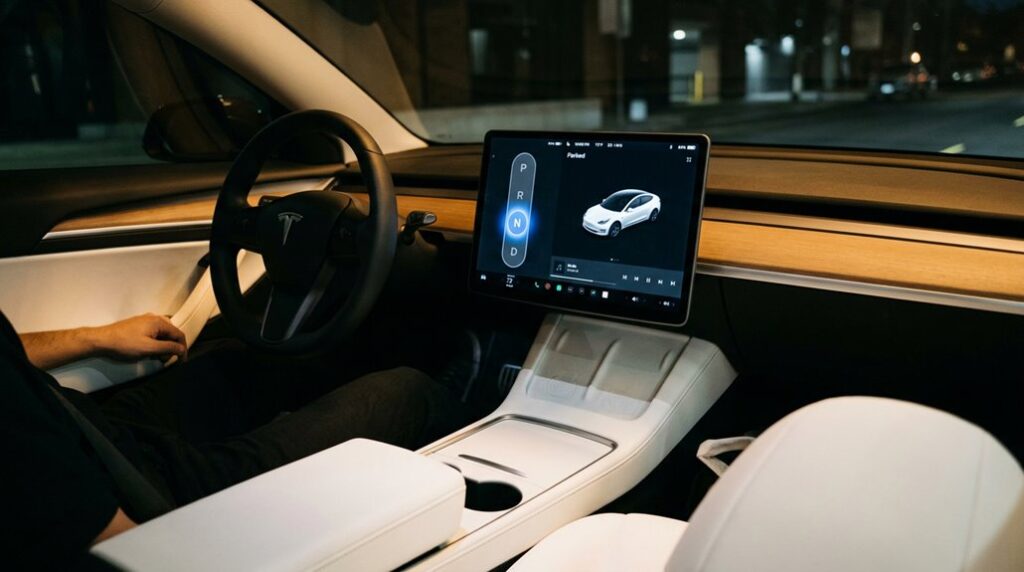
Bring the vehicle to a complete stop first. From there, press the brake pedal if the drive strip isn’t already visible — that input triggers the interface to surface your gear options. You’ll see the Neutral icon appear on the drive strip. Tap it, and on some models, hold it briefly to satisfy driver confirmation requirements built into the system.
Watch for the “N” indicator on screen before releasing the brake. Some newer Model S and X variants also offer lit console buttons below the screen — tap the console area to light them up, then press “N” directly. Account for minor touchscreen latency, and you’re rolling. It’s worth noting that Tesla’s over-the-air software updates can alter how gear selection interfaces behave post-purchase, so the exact steps may shift slightly after a vehicle update.
How to Put Your Tesla in Neutral at a Car Wash
Now that you know how to engage Neutral through the touchscreen or stalk under normal conditions, the car wash scenario adds a layer of operational subtlety worth grasping. Car wash etiquette for Tesla owners means more than just folding your mirrors.
Navigate to Controls and activate Car Wash Mode before you reach the conveyor alignment point. This disables parking brake auto-engagement, suspends Summon, and locks the windows. Once inside, you’ll see an “Enable Free Roll” option appear. Tap and hold it. That action creates a locked Neutral specifically engineered for conveyor-style washes, where the belt physically pulls the vehicle forward.
Standard Neutral works differently. It leaves certain automatic braking behaviors partially active, which can interrupt the conveyor’s movement. Free Roll eliminates that interference entirely. When selecting accessories like wireless charging pads or interior mounts to use daily in your Tesla, verifying model-year fitment is just as critical as understanding these operational modes.
When the wash finishes, press the brake pedal to exit Free Roll and return to Drive. Simple, deliberate, correct. Car Wash Mode is accessible through the Service menu found by scrolling down after tapping the car icon at the bottom of the screen.
Why Your Tesla Shifts Back to Park and How to Stop It
If your Tesla keeps snapping back to Park mid-maneuver, you’re not imagining things — the car’s rollaway-prevention logic is actively working against you.
Tesla’s auto-Park system monitors several inputs simultaneously (seat belt status, door position, seat occupancy, and vehicle speed) and will shift into Park the moment it decides you might be abandoning the vehicle, even if you’re just inching out of a tight spot.
The good news is that Tow Mode fundamentally disables this safety logic by overriding the auto-Park triggers, which is exactly why it’s the correct fix when you need the car to stay in Neutral without constantly fighting the system. Tesla vehicles also receive over-the-air updates that can occasionally modify safety system behavior, so it’s worth checking your software version if auto-Park seems more aggressive than expected after a recent update.
Most Tesla owners only think about Neutral as a simple gear shift step, but the real challenge shows up during car washes or transport situations where the vehicle is moving without full driver control, and even small preparation gaps can lead to unnecessary stops or stress. Having a dedicated all-weather Tesla interior protection and car wash prep kit helps reduce friction during these moments, keeping the cabin protected and the process smoother when the car is placed into Neutral for washing or rolling scenarios.
Auto-Return Explained
Opening a door, releasing your seatbelt, pressing the brake pedal in certain circumstances, or simply letting the car detect that no valid driving situation exists to justify holding Neutral — any of these triggers Tesla’s auto-return sequence. The car shifts back to Park automatically, and that’s intentional.
Tesla’s safety logic is built to favor immobilization over an ambiguous gear state. It won’t leave you rolling in Neutral if the system decides conditions don’t support it. This ties directly into autopilot interaction: since Autopilot operates at SAE Level 2, it requires continuous driver engagement, and any interruption (door open, seatbelt unlatched) collapses that circumstance entirely. Tesla’s NACS connector standard unifies Supercharger, Destination, and home charging under one plug design, reflecting the same systems-level thinking that governs how the car manages gear states and driver inputs.
Neutral isn’t a persistent state here. It’s conditional. Eliminate the triggering input, and you keep it — simple as that.
Tow Mode Fix
- The key must be detected inside the vehicle.
- The charging cable must be fully disconnected.
- The brake pedal must be pressed during activation.
Some Model S and X units have a known software debugging quirk — toggle Tow Mode on, then immediately off, to release free-rolling.
Note that Model S and X production has ended, meaning service and towing support for these vehicles now relies entirely on existing units without the benefit of ongoing factory refinements.
Before starting winching procedures, install the tow eye and chock the tires. Simple, but critical.
Mistakes That Put You in Reverse Instead of Neutral
Accidentally landing in Reverse when you meant to select Neutral is one of the more humbling mistakes a Tesla driver can make, and the design logic behind the stalk-based control system is largely to blame.
Neutral and Reverse sit close together in Tesla’s shifting workflow, and that proximity invites human error, especially when you’re moving slowly or canceling Autopilot reflexively.
Here’s where design ambiguity compounds the problem: stalk-based Teslas (pre-late-2021 models) use the same physical input for gear selection and automation control. Pull that stalk expecting to disengage cruise control at a stoplight, and the car may interpret your input as a Reverse command instead.
Forum reports and federal safety complaints confirm this isn’t a rare edge case.
The Cybertruck sidesteps this confusion entirely by replacing the stalk with a steer-by-wire system that eliminates the mechanical steering column and uses software-driven actuators to handle driver inputs more precisely.
The fix is straightforward. Always verify your selected gear on the touchscreen display before releasing the brake.
Slow-speed situations demand deliberate inputs, not reflexive ones.
When a Tesla is placed in Neutral—whether for towing, a car wash conveyor, or a service situation—it no longer holds itself in Park, which means even a slight slope or unintended push can allow the vehicle to shift position if it isn’t properly secured. That’s why many owners keep heavy-duty wheel chocks for EV and Tesla safety on hand, ensuring the car stays firmly in place during Neutral-mode situations where stability depends on external support rather than the drivetrain.
Frequently Asked Questions
Can You Put a Tesla in Neutral Without Pressing the Brake Pedal?
Yes, you can often skip the brake pedal when shifting from Drive or Reverse into Neutral. However, for a keyless override or emergency tow from Park, you’ll need to press the brake first.
Does Putting a Tesla in Neutral Affect Its Battery or Regenerative Braking?
Yes, neutral creates battery impact and regen loss — congrats, you’ve opened the worst of both worlds. You’re still draining power from systems while losing all that sweet energy recovery.
Will Tesla Automatically Shift Out of Neutral if It Detects an Obstacle?
No, your Tesla won’t trigger automatic re-engagement out of Neutral based on obstacle detection alone. You’ll need to manually shift back into Drive or Reverse yourself to regain full vehicle control.
Can a Passenger Shift a Tesla Into Neutral While the Driver Is Outside?
Technically, a passenger *can* wrestle with the passenger controls to shift into Neutral, but Tesla’s door interaction detection will almost in all likelihood override everything, automatically snapping back into Park the moment it senses you’ve exited.
Does Neutral Behave Differently in a Tesla With Autopilot Actively Engaged?
No, Neutral doesn’t behave differently during Autopilot shifts—it simply removes drive torque regardless. Once you select Neutral, you’re coasting freely, and parking behavior remains standard unless you’ve enabled Tow Mode.