
Most Tesla owners assume a premium EV means premium comfort — then August arrives and the range disappears before the destination does. Your Tesla’s climate system is genuinely sophisticated, running a heat pump rather than a conventional compressor, yet the hardware alone won’t save you from a sweltering cabin or a battery that drains faster than expected. The difference between suffering and comfort often comes down to configuration, not capability. There’s far more control buried in that touchscreen than most owners ever use.
Why Your Tesla AC Underperforms and How to Fix It
When your Tesla’s A/C starts blowing lukewarm air instead of cold, the culprit usually falls into one of four categories: low refrigerant, a blocked condenser, a faulty compressor or expansion valve, or something as mundane as a clogged cabin air filter. Each failure point behaves differently, so diagnosis matters.
Lukewarm air from your Tesla’s A/C points to four likely culprits — and diagnosing the right one matters.
Refrigerant leaks are the most deceptive issue. Your system may still run, cycling the compressor and moving air, but without adequate charge pressure, it simply can’t transfer enough heat to cool effectively. You’ll notice weak cooling at idle that slightly improves at highway speeds.
Condenser blockage works differently. Bugs, road grime, and packed debris restrict airflow across the condenser face, raising high-side pressure and forcing the system to work harder for less output. Cleaning it regularly prevents this entirely.
Start simple: check your cabin air filter first. A clogged filter mimics refrigerant problems convincingly, and replacing it costs almost nothing. Only a qualified technician should inspect and recharge refrigerant levels, as DIY attempts risk system integrity and may void your warranty. It’s also worth noting that regional builds differ in thermal management calibration, with EU thermal management thresholds for pack cooling and heating set to different trigger points than North American vehicles, which can influence how aggressively the climate system operates.
When your Tesla’s air conditioning starts working harder than it should, it’s often not the system itself—it’s what’s flowing through it. Dust, pollen, and cabin buildup quietly reduce cooling efficiency and air quality over time, especially in hotter climates. Improve the airflow and cooling performance with a Tesla cabin air filter upgrade before weak circulation and stale air start affecting every drive.
How to Configure Auto Mode, Fan Speed, and Vent Direction
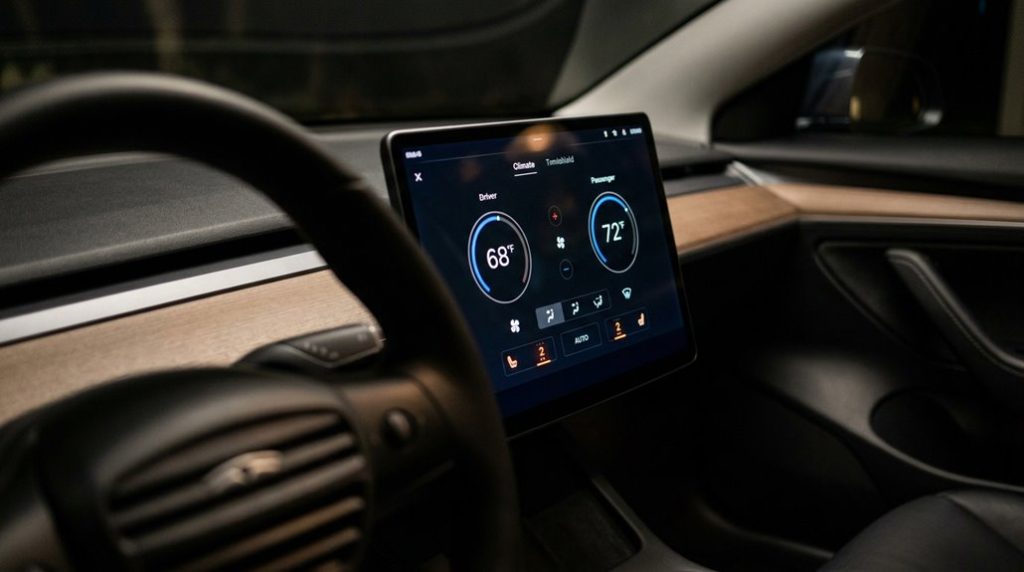
Fan speed adjusts automatically in three broad bands (Low, Medium, High) rather than precise increments, though you can override it manually when airflow feels too aggressive or sluggish.
Vent reshaping is where real comfort enhancement happens. Drag the airflow waves on the touchscreen to redirect streams around occupants rather than straight at them—split streams form when you push vents outward or inward from center. Combine windshield, face-level, and foot-level zones simultaneously for layered airflow that no single vent can deliver alone. When you want the system to take over entirely, Auto mode manages both temperature and fan speed automatically without requiring manual input.
Climate control is among the many traditional functions that Tesla moved behind the touchscreen interface, consolidating fan speed, vent direction, and temperature settings into software menus that previously existed as dedicated physical knobs and buttons.
How Tesla’s Heat Pump AC Actually Works
Adjusting vents and fan speeds shapes comfort inside the cabin, but the system doing the actual thermal heavy lifting operates invisibly behind the dashboard—and it’s more sophisticated than most drivers realize. Tesla’s heat pump runs on reversible refrigeration, meaning the same hardware cools in summer and heats in winter by simply flipping the thermodynamic cycle’s direction.
Here’s the clever part: instead of burning electricity to generate heat directly (resistive heating wastes energy converting every watt into warmth), the pump *moves* existing heat. It harvests thermal energy from outside air, the battery pack, or drive units, then amplifies it through compression. That efficiency gap is real—under ideal conditions, energy consumption drops roughly 15–20% compared to conventional approaches. Tesla’s onboard neural networks continuously process real-time data from the vehicle’s sensors, and this same computing infrastructure supports the coordination of thermal management decisions alongside driving assistance functions.
The Octovalve handles thermal routing, redirecting refrigerant and coolant across multiple circuit paths as conditions change. You’re not just running air conditioning; you’re managing an integrated thermal network. If the digital infrastructure supporting remote climate features ever fails, owners should ensure cloudflared is running and able to reach the network before assuming the vehicle system itself is at fault.
Tesla App Settings That Reduce AC Energy Use and Protect Range
Most drivers never think about their Tesla’s climate settings until they’re already sweating behind the wheel—by which point the battery’s already paying the bill.
Smarter choices start in the app, before you’re near the car.
- Precondition while plugged in. Use the Tesla app’s Schedule feature to set your departure time—the cabin reaches target temperature on grid power, not battery reserves.
- Use Scheduled Charging windows. Align preconditioning with overnight charging so both finish simultaneously, leaving the pack warm and full.
- Set climate to Auto, not maximum. Aggressive temperature targets burn more energy; moderate settings reduce HVAC load noticeably.
- Switch to Seat Heating in cold weather. Seat heaters consume far less energy than full cabin heating—same comfort, lower draw.
Finally, disable Sentry Mode and Cabin Overheat Protection when they’re unnecessary. Where weather allows, shaded parking can reduce cabin temperature naturally, lessening the demand on climate systems before you even open the app. Keeping your daily charge limit between 70 and 80 percent also preserves the buffer needed to absorb the extra energy demand climate systems place on the battery during extreme temperatures.
Every idle feature running while parked quietly drains range you’d rather keep.
Tesla cabins heat up fast when parked, and that trapped heat forces your air conditioning to work harder than necessary the moment you start driving. Most owners don’t realize how much range and comfort they’re losing until the AC is constantly fighting to catch up. Reduce cabin heat before it builds up with a Tesla sunshade and heat reduction accessory so your cooling system doesn’t start every drive at a disadvantage.
Frequently Asked Questions
How Often Should Tesla Cabin Air Filters Be Replaced for Optimal Cooling?
You should replace your Tesla’s cabin air filters every 2 years to maintain peak filter lifespan and particle capture efficiency. In dusty or polluted conditions, you’ll want to shorten that interval to annually.
Can Preconditioning the Tesla Cabin Before Driving Improve Overall Battery Range?
Oddly enough, doing nothing before your drive costs you more range. By activating battery preconditioning while plugged in, you’ll enhance thermal management, reduce energy waste at departure, and genuinely improve your Tesla’s overall battery range.
Does Cabin Overheat Protection Continue Running When the Tesla Is Locked?
Yes, it keeps running even when you lock your Tesla. It’ll maintain cabin ventilation and act like solar shielding for up to 12 hours, stopping only if your battery drops below 20%.
What Temperature Setting Avoids Doubling Energy Consumption in Hot Weather?
Set your cabin to 71°F (21.7°C) or lower for proper setpoint guidance. Above that, you’ll trigger active heating instead of light compressor cycling, which can roughly double your energy consumption in hot weather.
Can Lowering Windows Before Entering Reduce Cabin Heat Without Draining Battery?
Before entering your scorching, sun-baked Tesla, open windows to release that suffocating trapped air — it’s passive cooling that won’t drain your battery, though it’s no substitute for preconditioning.