
Tesla batteries “never overheat” — that’s the claim. Here’s why it’s more complicated than the marketing suggests. Most lithium-ion cells collapse catastrophically above 60°C, yet Tesla’s packs absorb hundreds of kilowatts during Supercharging without incident. That gap between fragile chemistry and real-world resilience isn’t accidental. It’s the result of a precisely engineered system operating across thermal, chemical, and computational layers simultaneously — and understanding exactly how it works changes everything you thought you knew about battery technology.
What Causes a Tesla Battery to Overheat?
Tesla batteries don’t overheat because of one dramatic failure — they overheat because multiple stressors compound faster than the thermal management system can compensate. Think of it as a queue that moves faster than the checkout line can handle.
The usual suspects include repeated Supercharging sessions, aggressive driving at sustained high speeds, and extreme ambient temperatures — sometimes all three hitting simultaneously. Each adds thermal load to the pack, and when stressors stack, thermal propagation becomes your real problem: heat spreads through cells faster than coolant can extract it. Cold batteries charge slower due to sluggish chemistry, but the inverse is equally true — a pack already warm from highway driving arrives at a Supercharger with a significantly higher baseline thermal load.
Charging hardware failures, blocked radiators, and low coolant levels quietly accelerate this process. Battery aging compounds the issue further, since older cells manage heat less efficiently than new ones. A degraded pack operating in summer heat during a back-to-back Supercharging session isn’t just warm — it’s a thermal management system working well outside its comfort zone. Parking in shaded or climate-controlled areas during hot weather can meaningfully reduce the baseline thermal load before a drive or charging session even begins.
Tesla’s glass-heavy design makes the cabin heat up fast, and once heat soak builds, the battery cooling system has to work harder than it should—especially after parking in direct sun. A Tesla Sunshade Windshield & Roof Glass Cover Set reduces that heat buildup before it starts, helping keep interior temperatures lower and easing unnecessary thermal strain on the battery.
How Tesla’s Liquid Cooling System Prevents Battery Overheating
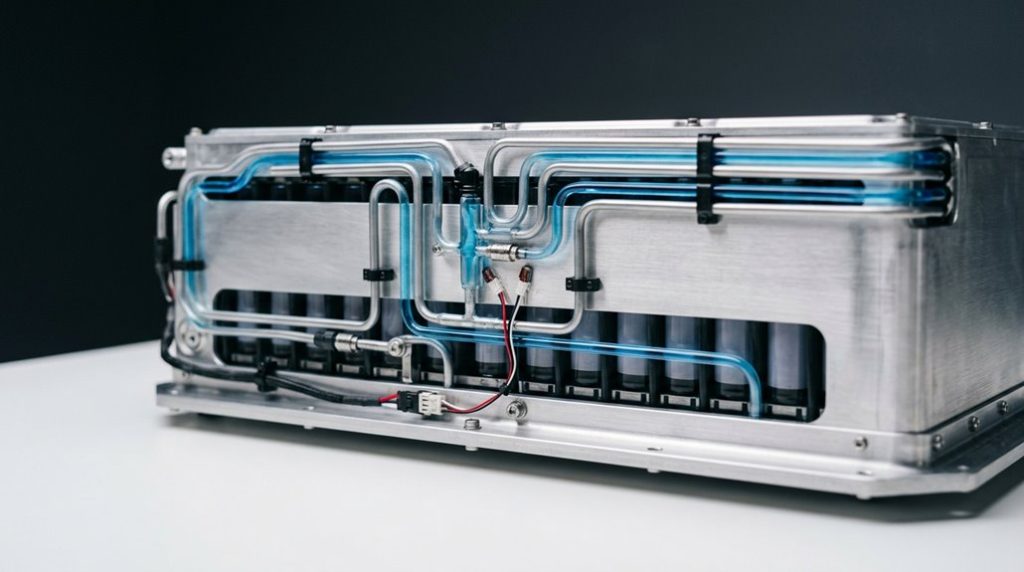
Unlike air cooling — which relies on ambient airflow and works about as well as you’d expect when you’re parked in Phoenix in July — Tesla’s liquid cooling design uses a closed-loop water-glycol mixture that actively pulls heat away from the battery cells throughout every drive, charge, and idle cycle.
The coolant chemistry matters here. Water-glycol carries heat far more efficiently than air, moving thermal energy through serpentine channels toward a radiator where it dissipates safely. Tesla’s battery pack weight ranges from 800 to 1,200 pounds compared to similar combustion vehicles, making efficient thermal management even more critical to overall vehicle safety and performance.
| System Element | What It Actually Does |
|---|---|
| Water-glycol coolant | Absorbs heat directly from cells |
| Serpentine channels | Maximizes surface contact across the pack |
| Circulation pump | Keeps coolant moving continuously |
| Heat exchanger | Releases captured heat to outside air |
| Temperature sensors | Adjust flow based on real-time pack conditions |
Pump redundancy guarantees circulation never stops — even under heavy Supercharging loads — keeping temperatures within that critical 20–35°C window where your battery genuinely thrives. Thermal runaway prevention is one of the most critical outcomes of this system, as uncontrolled overheating can trigger cascading chemical reactions that lead to fire or catastrophic battery failure.
How Tesla’s BMS Software Controls Battery Heat
The liquid cooling hardware gets the heat out, but something has to tell it when to act, how hard to push, and when conditions are edging toward a problem — that’s the Battery Management System (BMS) software’s job. It processes thousands of data points per second across every cell and module, tracking voltage, current, and temperature simultaneously.
When temperatures climb toward unsafe thresholds, the BMS throttles charging or discharge power adaptively — no fixed limits, just precise, real time diagnostics driving the decisions. That responsiveness keeps thermal runaway from gaining any foothold.
Predictive preconditioning takes it further. Before you hit the highway or plug into a Supercharger, the software anticipates what the battery will face and adjusts pack temperature accordingly. You’re not shocking cold or warm cells into sudden stress — you’re arriving prepared.
It’s coordinated, intelligent battery management that makes the hardware work smarter, not just harder. Tesla’s over-the-air software updates mean the BMS itself can be refined and improved after the vehicle leaves the factory, extending the intelligence of thermal management without any physical intervention. The page’s build level is designated as serverRender, meaning the system processes and delivers structured outputs much like the BMS resolves complex thermal decisions before they reach a critical state.
How Tesla Handles Fast Charging and Extreme Heat
Fast charging isn’t just about plugging in and waiting — it’s a thermal negotiation between your battery pack and the Supercharger, and heat is the variable that controls how that negotiation goes.
When your battery’s too hot, the BMS throttles incoming current to prevent unsafe heat buildup. When it’s too cold, energy gets diverted to warming the pack instead of actually charging it.
Preconditioning timing is everything here.
Navigate to a Supercharger through Tesla’s Trip Planner, and the system automatically brings your pack to its ideal temperature window before arrival — meaning you hit peak charging rates immediately instead of waiting. In extreme heat, that window narrows fast.
Shade parking helps more than you’d think.
Starting a charging session from a less heat-soaked state reduces the cooling load your thermal system has to fight, keeping charging power stable longer and protecting long-term battery health throughout the session. Tesla’s thermal management also plays a direct role in battery replacement likelihood, with most owners unlikely to need a pack swap within the first five years of ownership.
Third-party tools like the S3XY app can take battery warming further than Tesla’s native preconditioning, raising pack temperature by over 20°C in 30 minutes compared to just 3.3°C from Tesla’s built-in system alone.
Can a Tesla Battery Actually Overheat?
Yes, a Tesla battery can overheat — but it’s engineered to make that outcome genuinely difficult to reach. Under normal conditions, Tesla’s liquid thermal management system pulls heat away from individual cells before temperatures climb into dangerous territory.
Tesla batteries can overheat — but liquid thermal management makes that outcome genuinely difficult to reach under normal conditions.
That said, extreme ambient heat, sustained aggressive driving, or repeated high-power demands can push thermal load beyond what the cooling system dissipates quickly.
When overheating does occur, the real risks are thermal runaway — a self-reinforcing chemical reaction where cell heat accelerates uncontrollably — and cell swelling, where internal gas pressure physically deforms the battery pack. Both scenarios are serious.
Tesla’s battery management system monitors cell temperatures continuously, throttling power output and ramping up coolant flow before either condition develops.
Tesla’s onboard systems also draw on collective cloud data gathered across the entire vehicle fleet to refine how the car responds to demanding thermal and driving conditions over time.
You’re unlikely to experience catastrophic failure under typical ownership. However, ignoring persistent thermal warnings, skipping software updates, or driving hard in extreme heat without precautions meaningfully narrows the safety margin the system relies on.
Once a Tesla’s cabin heat soaks in, the battery cooling system has to fight both interior temperature and external load, which can add unnecessary strain in hot weather. A Portable Car Cabin Cooling Fan helps move trapped air and lower interior heat before driving, reducing how hard the system has to work right from startup.
Frequently Asked Questions
Does Cabin Overheat Protection Drain the Tesla Battery While Parked?
Yes, cabin cooling does drain your battery while parked. The system’s battery draw depends on heat, sun exposure, and settings. Plugging in your Tesla eliminates this concern entirely.
How Does Very Cold Weather Affect Tesla Battery Thermal Management?
In freezing temps, your battery fights to stay warm instead of powering you forward — that’s the cold start penalty. You’ll reclaim efficiency through preconditioning benefit, letting the system warm up while still plugged in.
Are Tesla Powerwall Thermal Risks the Same as Vehicle Battery Risks?
No, they’re not the same. Your Powerwall focuses on stationary faults and grid integration failures, lacking vehicle-level fire suppression demands. EV batteries face variable driving, fast-charging stress, and aggressive thermal loads that Powerwalls simply don’t encounter.
Can Tesla Remotely Manage Battery Temperature Without Driver Involvement?
Yes, Tesla’s like a silent guardian—it handles remote preconditioning and autonomous cooling without your input, automatically adjusting battery temperature based on charging, route guidance, and ambient conditions to keep everything running at peak efficiency.
Does Repeated Fast Charging Permanently Damage Tesla Battery Cooling Systems?
Repeated fast charging won’t permanently damage your cooling system, but it does increase cooling wear through thermal cycling. You’re adding charge stress over time, so proper maintenance protects battery longevity better than avoiding Superchargers entirely.