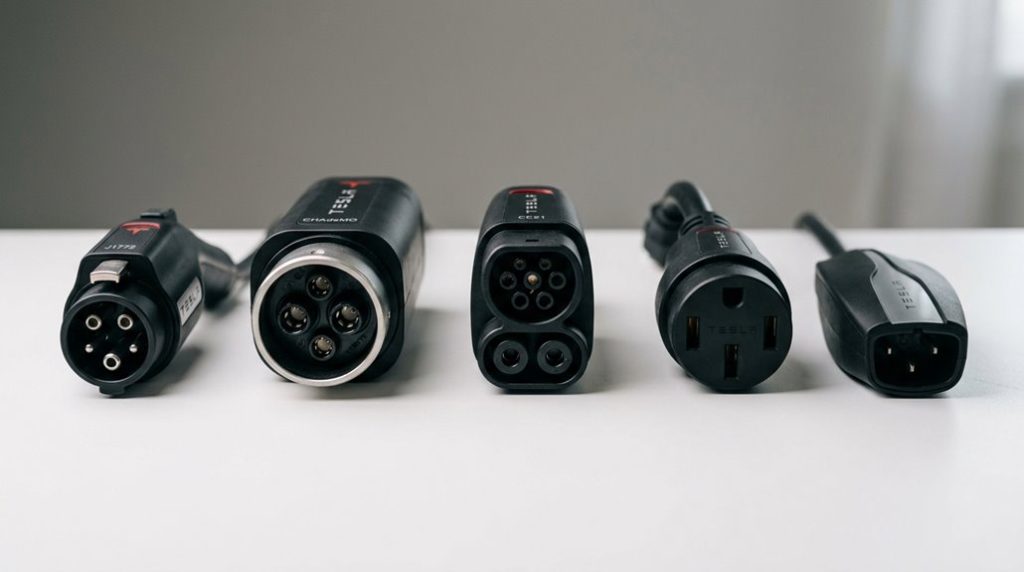

Most Tesla owners treat adapters like an afterthought—until they’re stuck at a charging station with a dying battery. But these aren’t simple accessories. They’re current-carrying components that directly impact charging speed, safety, and whether you charge at all. Your inlet type alone—J1772, CCS1, or NACS—determines everything. And the gap between OEM and third-party options? It’s wider than the industry wants you to believe. The specs reveal a story worth knowing before your next road trip.
Which Tesla Adapter Do You Actually Need?
Figuring out which Tesla adapter you need comes down to one thing: your car’s inlet type. Your vehicle’s port—J1772, CCS1, or NACS—determines everything. Get this wrong, and no adapter in the world helps you.
For AC charging (Level 1 or Level 2 at home or destination chargers), a Tesla-to-J1772 adapter bridges non-Tesla EVs to Tesla Wall Connectors and destination chargers. These support standard 120V and 240V setups, with some rated up to 48 amps for higher-output hardware.
For DC fast charging at Superchargers, CCS-equipped EVs need a NACS-to-CCS adapter instead—completely different product, non-interchangeable. OEM adapters remain the safest default choice (cleaner third-party warranties aside), reducing guesswork around current limits and network compatibility. Non-Tesla EVs like the Chevy Equinox EV can access 17,800+ Tesla Superchargers across North America using a dedicated NACS adapter.
Installation tips are straightforward: confirm your inlet type first, then verify amperage ratings match your hardware. Mismatched connections don’t just fail—they fail expensively. Cable length also varies between Tesla destination chargers, with some running as short as seven to eight feet, so your vehicle’s charge port location can directly affect whether you get a usable connection at all.
Best Adapters for Tesla Supercharging
Accessing Tesla Superchargers in a non-Tesla EV isn’t just plug-and-play—you need a NACS-to-CCS DC fast-charging converter, and not just any adaptor will do. Your adaptor must handle serious electrical loads: we’re talking 500A and 1000V territory, which is exactly what the Lectron Vortex Plug delivers. Car and Driver even named it their top third-party pick, preferring its latching system over competing options like the A2Z EV adaptor.
Adaptor durability matters here because Supercharger stalls aren’t gentle environments—high-current cycling stresses connectors repeatedly. However, don’t overlook manufacturer authorization. Rivian, for instance, only sanctions their own NACS DC adaptor for Supercharger use, making generic fitment irrelevant if your automaker disagrees.
Observe basic charging etiquette: verify your vehicle’s software supports non-Tesla Supercharging before occupying a stall. Tesla-branded adaptors remain the safest universal bet, but always cross-reference your automaker’s official policy first. Non-Tesla EVs without the required software updates cannot use third-party adaptors to bypass software restrictions at Superchargers. Tesla’s V4 Supercharger cabinets support voltages ranging from 400V to 1,000V, meaning your adaptor must be rated to handle the full voltage range to ensure safe and compatible operation across all station types.
Showing up at a public charger only to find it isn’t Tesla-compatible is the kind of inconvenience that can derail an entire trip plan. A J1772 to Tesla Charging Adapter sits in your trunk as a simple backup, giving you access to most Level 2 charging stations and keeping your options open wherever you park.
Best Adapters for Tesla Destination and Home Charging
Switching from DC fast-charging territory to Level 2 AC charging means the electrical stakes drop considerably—but the converter choice still matters. For non-Tesla EVs accessing Tesla Destination Chargers or NACS-equipped home wall connectors, you’ll need a NACS-to-J1772 adaptor. The Lectron Tesla-to-J1772 adaptor handles this cleanly, rated at 48A and 250V—enough headroom to match most destination chargers without creating a power bottleneck.
Adaptor durability becomes critical here because Level 2 sessions run longer than Supercharger stops, meaning the connector endures sustained thermal and mechanical stress. A locking mechanism isn’t optional; it’s responsible charging etiquette, especially during unattended overnight sessions at hotels or garages. The Lectron adapter is SGS certified under UL 2251, giving it a verified safety baseline that matters during those extended overnight connections.
Avoid anything claiming DC fast-charging capability at Level 2—that’s a red flag, not a feature. Your vehicle’s onboard charger finally caps the rate anyway, so match your adapter’s amperage ceiling (48A recommended) to your charger’s output and move on. When selecting any charging adapter, always verify model and year compatibility rather than assuming a generic listing covers your specific vehicle configuration, since fitment errors on electrical components carry real safety consequences.
A Tesla without a reliable backup charging option can quickly turn a simple overnight stay or road trip stop into a planning headache, especially when wall connectors or Superchargers aren’t nearby. A NEMA 14-50 Portable EV Charger gives you flexible 240V charging wherever a compatible outlet is available, keeping your range topped up without relying on public infrastructure.
How to Check Compatibility Before You Buy
Before you spend a dime on an adapter, you need to confirm two things that most buyers skip: whether your vehicle is actually authorized for the network you’re targeting, and whether the specific charger type at your destination matches the converter you’re eyeing. Vehicle eligibility isn’t universal—some Tesla stations stay Tesla-only regardless of connector type.
Use app verification tools before purchasing anything.
| Check This | Use This Tool |
|---|---|
| Supercharger access for your EV | Tesla app or Tesla.com/findus |
| Ford EV compatibility | FordPass app |
| Multi-network station options | PlugShare with vehicle filter |
| NACS partner locations | Tesla’s “NACS partner” filter |
A physical plug match means nothing without software authorization behind it. V3 and V4 Superchargers typically support non-Tesla EVs, but confirmed access depends on manufacturer agreements. Cross-reference your vehicle’s approved adapter list against the station type before committing to any purchase. The adapter you select should carry UL2252 certification, as this confirms it has been lab-tested for temperature extremes, water intrusion, drop resistance, and safe shutdown behavior under real charging conditions.
Tesla’s V3 Superchargers can deliver up to 250 kW of power, enabling roughly 200 miles of range in as little as 15 minutes under optimal conditions.
Frequently Asked Questions
Can I Use Multiple Tesla Adapters Simultaneously on the Same Vehicle?
No, you can’t use multiple Tesla converters simultaneously on the same vehicle. If you’re switching between Level 2 and DC fast charging, converter compatibility requires one connection per charging event for safe, reliable simultaneous charging.
Do Tesla Adapters Come With Any Warranty or Replacement Guarantee?
Yes, Tesla adapters do come with warranty coverage. If your adapter came with your vehicle, you’re covered for 4 years or 50,000 miles. The replacement process requires prompt Tesla contact after uncovering a defect within your warranty duration.
Are Tesla Adapters Waterproof or Safe to Use in Rainy Conditions?
Tesla adaptors aren’t fully waterproof, but they’re safe for rainy conditions when properly maintained. Weatherproof ratings like IP44 guide waterproof testing standards, so you’ll want to inspect seals and keep connections dry before every outdoor charging session.
Will Using Third-Party Adapters Void My Tesla Vehicle Warranty?
Purely plugging in a problematic part puts your protection at risk. Third-party liability only triggers warranty exclusions if that adaptor directly caused your Tesla’s damage — not simply because you used it.
How Should I Store and Maintain My Tesla Adapter When Not in Use?
Store your Tesla adaptor in a protective pouch, away from moisture, sharp objects, and direct sunlight. Practice temperature monitoring by avoiding extreme heat or cold. Inspect contacts regularly, keep them clean, and replace the adaptor if damage appears.