
Storing a Tesla wrong doesn’t just inconvenience you — it quietly destroys your battery, kills your 12V system, and warps your tires while the car sits untouched. Most owners assume parking it is enough. It isn’t. The charge level you leave it at, the settings you configure, and the environment you choose will determine whether your Tesla wakes up ready to drive or refuses to wake up at all. Get these decisions right before you walk away.
How Battery Chemistry Changes Tesla Storage Rules
Before you park a Tesla for months and walk away, the chemistry sitting inside that battery pack changes almost everything about how you should do it. Tesla uses three primary lithium-ion chemistries—NCA, NMC, and LFP—and each one tolerates storage conditions differently.
LFP advantages are straightforward: you can charge those packs to 100% daily without consequence, they carry lower fire risk than nickel-based alternatives, and they handle long-term storage with less fussiness. Base trims typically carry LFP.
Nickel sensitivity runs in the opposite direction. NCA and NMC packs—common in Long Range and Performance trims—degrade faster when held at full charge for extended periods. Tesla’s traditional daily target sits near 80% for those chemistries, though newer nickel-based cells may tolerate up to 90%.
Regardless of chemistry, Tesla’s storage guidance converges on one number: 50%. Tesla’s shared hardware platform means that vehicles across trim levels use identical battery cells, with software switches determining how much of that capacity is accessible to the driver. Unlike nickel-based chemistries, LFP batteries do not use cobalt, reducing both the cost and environmental footprint of the cells inside your vehicle.
Set Your Tesla’s Battery to 40–50% Before Storage
For long-term storage, Tesla’s own support guidance lands on one specific number: 50%. That’s your ideal SOC target before parking the car for weeks or months. The 40–50% range gives the battery enough stored energy to handle standby drain without sitting in a high-stress, fully loaded state.
Here’s the practical setup: charge to roughly 50%, then set your charge limit to 50% inside the Tesla app. That prevents the battery from creeping higher if it stays plugged in. And yes, keep it plugged in when possible—the vehicle uses grid power to manage battery balancing and thermal regulation rather than pulling from stored charge. The 8-year battery warranty covering 100,000–150,000 miles on most modern Teslas makes proper storage habits especially worth protecting.
Avoid storing near 0% or 100%. Both extremes increase strain during idle periods. Think of 50% as the sweet spot where cell chemistry stays stable, voltage stress stays low, and you’re not gambling with an expensive battery pack. Research confirms that calendar aging is driven by SOC, temperature, and time, meaning a stored battery at lower mid-range SOC experiences significantly less capacity fade than one left at high charge.
Leaving a Tesla parked for weeks or months without proper charging habits can quietly wear down battery health faster than most owners realize, and the damage often shows up when it’s too late to reverse. Keep your battery stable and protected during long storage periods by setting up a Tesla battery tender smart charger so it stays at the right charge level even when you’re not driving.
Keep Your Tesla Plugged In to Protect Both Batteries
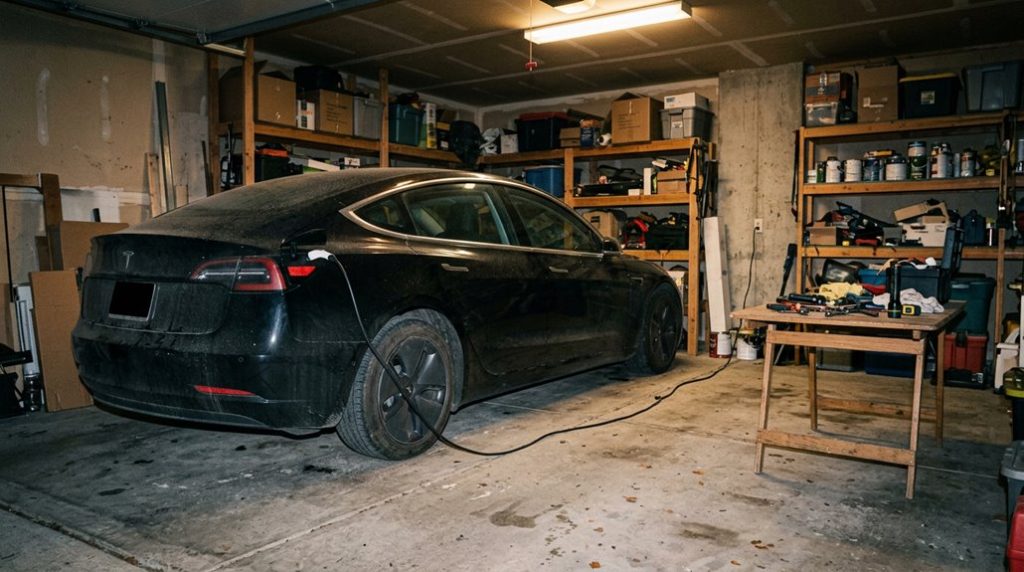
Once you’ve dialed in that 50% charge limit, the next move is straightforward: leave it plugged in. Tesla’s onboard battery management system actively monitors and maintains charge levels when connected, preventing the phantom drain that quietly eats into your pack during extended inactivity.
Plug in and let Tesla’s battery management system do the work — stability maintained, phantom drain stopped cold.
Here’s what staying plugged in actually protects:
- Traction battery stability – maintains your 50% target without dipping into damaging low-charge territory
- 12V auxiliary system – keeps support electronics powered without stressing the secondary battery
- Phantom drain prevention – offsets background energy consumption from climate and network functions
- Neighborhood theft prevention – Sentry Mode runs more sustainably when wall power compensates for its consumption
One practical note: avoid plugins from third-party apps that constantly wake your vehicle. Unnecessary app checks trigger active states, burning energy and defeating your storage strategy entirely.
Minimize connections, maximize stability — that’s the actual formula here. Software updates during storage consume battery power, so being plugged in ensures these background processes don’t silently pull your charge below the safe threshold before you return. For home charging during storage, a dedicated Wall Connector provides the most stable and consistent power delivery to keep your battery management system satisfied over weeks or months.
Tesla Settings That Silently Drain Your Battery During Storage
Even with your charge limit set and your Tesla plugged in, the vehicle can still bleed energy through a handful of settings that most owners never think to touch before walking away. Sentry Mode is the biggest offender — it keeps the cameras and sensors actively scanning, preventing the car from entering deep sleep and continuously pulling standby current. Turn it off if you’re storing in a secure location.
Cabin Overheat Protection is quieter but equally persistent, especially in warm environments where the system cycles frequently to manage interior temperature. Disable it before long-term parking unless extreme heat protection is genuinely necessary.
Summon Standby keeps systems awake for faster response times you won’t need during storage — switch it off. Finally, disable Bluetooth and Wi-Fi, since active connections delay sleep mode entry. Each setting seems minor individually, but together they compound into meaningful battery loss over weeks. To put this in perspective, a 2% daily drain can quietly erase roughly 14% of your battery’s charge within a single week of storage.
Most owners storing long-term also overlook that typical daily charge limits are already recommended at 70–80% capacity, meaning starting storage above that threshold adds unnecessary strain before parasitic drain even begins.
Tire, Paint, and Interior Prep for Storing Your Tesla
Protecting your Tesla’s tires, paint, and interior before storage takes real prep work — skip it, and you’re trading a few hours of effort now for degraded rubber, oxidized clear coat, and a cabin that smells like something died in it.
Before parking long-term, address these four priorities:
- Inspect tires for cracks, bulges, punctures, and embedded debris — tire rotation history affects wear patterns worth documenting now
- Inflate tires to manufacturer-recommended pressure (or slightly above) to resist flat-spotting under sustained inactivity
- Wash and wax exterior panels thoroughly, address paint touchups on chips before oxidation spreads underneath the clearcoat
- Vacuum and desiccate the cabin, removing food remnants and placing moisture-absorbing desiccant packs inside
Store indoors — cool, dry, ventilated, and shielded from UV exposure. Keep the vehicle on level ground.
Crack windows slightly to prevent stale, humid air from settling into upholstery and creating long-term odor problems.
Before storing, confirm your vehicle’s software version and any pending OTA update status via Controls, since a completed update before storage ensures the car isn’t left mid-process during an extended period of inactivity.
When a Tesla sits in one spot for too long, the weight on the tires can slowly create flat spots that you won’t notice until the first drive feels slightly off and uneven. Avoid that frustrating surprise by parking on Tesla tire cradle supports so your tires stay evenly supported and ready to roll when you are.
Frequently Asked Questions
Can I Store My Tesla Outdoors Without a Garage or Shelter?
You can store your Tesla outdoors without a garage. Use solar covers to block UV rays and heat. Without security cameras nearby, you’ll want Sentry Mode disabled to conserve battery during storage.
How Long Can a Tesla Safely Sit in Storage Without Damage?
Think of your Tesla like a sleeping giant—it can rest safely for months with proper battery preservation. Keep charge near 50%, disable Sentry Mode, and don’t neglect tire care to prevent flat-spotting.
Should I Remove My Tesla’s Key Fob During Long-Term Storage?
You should remove the fob and store it separately for battery maintenance purposes. It won’t drain your Tesla’s traction battery, but removing the fob helps prevent accidental wake-ups during long-term storage.
Does Cold or Hot Weather Affect How I Should Prepare for Storage?
Both extremes affect your Tesla’s battery chemistry differently. In heat, charge to 50% and park in shade. In cold, keep it plugged in to maintain cabin materials and battery warmth.
Will Storing My Tesla Void Any Existing Warranty Coverage?
Like a sleeping bear, storage won’t automatically wake warranty problems. You don’t lose coverage just by storing your Tesla—though neglect, service exclusions, or warranty transferability issues could complicate claims if improper care causes damage.